

|
|
|
The idea for writing an introductory book on Digital Subscriber Line technology was first brought to me by Gail Nelson. Her initial proposal was just to concentrate on the subject of test equipment and in particular, wireline simulators. However, Michael Breneisen suggested that the work go beyond this focus and address the subjects of signaling devices and DSLAMs.
The detailed technical material in this work was obtained by researching many sources. A complete and particular acknowledgement of every source would have led to a plethora of footnotes. The reader often finds diversion to these an unwelcome distraction. As a result, I avoided their use. However, even with this intent I would be at fault if I did not give specific credit to the references given in the 'Bibliography.' I leaned in these heavily.
Ken Krechmer (Action Consulting, Palo Alto, California) was particularly helpful in directing me to needed references. His encyclopedic knowledge of Digital Subscriber Line technology is truly impressive.
Pat O'Hara served as both editor and graphic artist. She literally performed magic in taking my typed manuscript and turning it into this finished document.
Tony Horber took time from a busy product development schedule and checked the work for technical accuracy. I am indebted to him.
The subject of interest in this book is the use of Digital Subscriber Line (DSL) technology to increase the rate and improve the quality of data communications over copper cable. It is an important topic both within the context of data communications today and into the future. All, or almost all, aspects of this subject will be explored. However, it seems rather forbidding just to jump into this topic. Rather, it is more appropriate to take a step back and talk about the nature of communications first, in order to introduce some needed terminology. Such a step back will also provide us with a broader perspective on the subject of DSL technology as a transmission facilitator. In short, it will help us to answer the question, "Why should we be interested in DSL?"
The reader well-versed in data communications may, of course, choose to skip this introduction and suffer no real penalty.
The subject of communications really begins with the situation shown in Figure 1-1. Here is an entity called the Source and one called the User - located remotely from the Source. The Source generates Information, and the User desires to learn what this Information is.
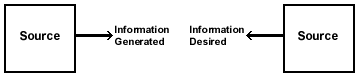
Figure 1-1: Source, User pair with information
Examples of this situation abound. However, let us focus our attention on the case illustrated in Figure 1-2. Here, the Information is a sequence of binary digits - 0s and 1s, commonly called "bits." Information in this case is termed "data." Information of this type is generally associated with computers, computing-type devices, and peripherals - equipment shown in Figure 1-3. Limiting Information to data presents no real limitation. Voices, images, indeed most other types of Information can be processed to look like data by carrying sampling and Analog-to-Digital conversion.

Figure 1-2: Representations of information

Figure 1-3: Examples of sources and users generating/desiring "data"
In practice, it is impossible for the User to obtain the Information without the chance of error. Such errors may spring from a variety of deleterious effects, which we will examine, in greater detail later in this chapter.
The possibility of error means that the User seeking the Information - that is, the binary sequence - must be content in learning it to within a given fidelity. The fidelity measure usually employed is the Bit Error Rate (BER). The BER is the probability that a specific generated binary digit at the Source, a bit, is received in error, opposite to what it is, at the User.
There are some real questions as to how appropriate this fidelity measure is in certain applications. Nonetheless, it is so widely employed in practice that further discussion is not warranted.
The question then arises as to how to send the binary data stream from the Source to the User. We refer to any physical entity used for this purpose as a Transmission Medium.
As shown in Figure 1-4, the Transmission Medium is located between the Source and the User, accessible to both. The Transmission medium has a set of properties described by physical parameters. This set of properties exists in a quiescent state; however, at least one of these properties can be stressed or disturbed at the Source end. This is accomplished by imparting energy in order to stress the property. The disturbance affects the parts of the Transmission Medium around it, then travels from the Source end to the User end. Once the disturbance or stressed property reaches the User end, it can be sensed and measured. This propagation of a disturbance by the Transmission Medium is illustrated in Figure 1-5.
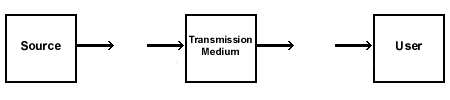
Figure 1-4: Source, transmission medium, user
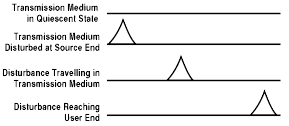
Figure 1-5: Disturbance traveling in transmission medium
There are many types of transmission media. The Transmission Medium could be air, with the stressed property being the air pressure put on sound waves. It could be an electromagnetic field set up in space by the current put on an antenna - a radio or wireless system. It could be a pair of electrical conductors, with the stressed property being the potential difference (the voltage) between the conductors - an electrical transmission line. It could be a cylindrical glass tube with the stressed property being the intensity of light in the tube - a fiber optic cable. Even written communication can be interpreted in this fashion: a sheet of writing paper provides the Transmission Medium, with the stressed property being the light-dark pattern on the paper.
The Source can have a disturbance to the Transmission Medium generated in sympathy to the Information - that is, it can generate a disturbance which varies in time exactly as the Information. This encoded disturbance will propagate to the User. The User can then sense the disturbance and decide the identity of the Information that it represents. The process of the Source generating a disturbance in sympathy with the Information and launching it into the Transmission Medium is referred to as "modulation and transmission." The process of the User sensing the received disturbance and deciding what Information it represents is referred to as "reception and demodulation." In this work, we will refer to the device that carries out modulation and transmission as the Transmitter. We will refer to the device that carries out reception and demodulation as the Receiver.
The whole of data communications then devolves to the model illustrated in Figure 1.6. Here, the Source generates bits as Information. The User wants to learn the identity of this Information, these bits. The entities used to get the Information from the Source to the User are the Transmitter, the Transmission Medium and the Receiver. The fundamental problem of communications is to choose the terminal equipment - the Transmitter and Receiver - and to choose the Transmission Medium so as to satisfy the requirements for a given Source-User pair.

Figure 1-6: The model which represents the fundamental problem of communications
The fundamental problem of communications is one of design. Collectively, the combination of Transmitter, Transmission Medium and Receiver is known as the "communication link" or "data link" - the latter term deriving from the limitation placed on the Information to the form of a sequence of bits. The disturbance launched into the Transmission Medium by the Transmitter is usually referred to as the "input data signal." The resulting disturbance at the Receiver is termed the "output data signal." In the context of our discussion, the fundamental problem is to design a data link appropriate for connecting a given Source-User pair.
There is no cookbook method to solve this design problem and come up with the best unique solution. While there is science here, there is also art. There are always alternative solutions. Each solution has its own particular twist, which in turn provides some additional attractive feature to the solution. However, the feature is peripheral to Source-User requirements.
Most exercises in obtaining the design solution usually begin with choosing a Transmission Medium to meet the general requirements of the Source-User pair. In other words, the data link design process pivots on choosing the Transmission Medium. Every Transmission Medium has constraints on its operation, on its performance. It is these constraints that truly decide which Transmission Medium will be employed for the data link design.
Have a Transmitter launch a disturbance, an input data signal, into a Transmission Medium. As the disturbance propagates down the Transmission Medium to the Receiver, its amplitude will decrease, growing weaker and weaker. The disturbance is said to suffer attenuation, a situation illustrated in Figure 1-7.
One immediate question that arises is why does attenuation occur? There are several reasons. It would be worthwhile to point out and describe two of them: spatial dispersion and loss due to heat.
Spatial dispersion can best be considered by revisiting Figure 1-7, which illustrates a one-dimensional propagation of the disturbance. However, often, this disturbance may propagate in two or even three dimensions. The User/Receiver may be located in a small solid angle relative to the Source/Transmitter. The received disturbance, the output data signal, appears attenuated relative to the transmitted disturbance because, in fact, it represents only a small fraction of the overall energy imparted in the disturbance when it was launched. This is exactly the situation with free space propagation of waves through an electromagnetic field transmission medium, such as that which occurs in any sort of radio transmission.

Figure 1-7: Input data signal attenuating as it propagates down a transmission medium
Loss due to heat refers to the basic interaction of the disturbance with the material from which the Transmission Medium is comprised. As the disturbance propagates, a portion of the energy is transferred into the Transmission Medium and heats it. For a mechanical analogy, consider rolling a ball down a cement lane. The ball is the disturbance launched into the lane, which represents the Transmission Medium. As the ball rolls along, it encounters friction. It loses part of its kinetic energy to heating the cement lane and begins to slow down. The disturbance becomes attenuated. This is the situation with using the potential difference between a pair of electrical conductors as the Transmission Medium.
Attenuation increases with the distance through the Transmission Medium. In fact, the amplitude attenuation is measured in dB/km. As propagation continues, attenuation increases. Ultimately, the propagating signal is attenuated to a minimal detectable level. That is, the signal is attenuated until it can just be sensed by the Receiver - in the presence of whatever interference is expected. The distance at which the signal reaches this minimal level could be quite significant. The Transmission Medium has to be able to deliver at least the minimal detectable level of output signal to the Receiver by the User. If it cannot, communications between the Source and User cannot take place.
There are some tricks to getting around this. Suppose the disturbance has been attenuated to the minimal detectable level, yet it has still not arrived at the Receiver/User. The output signal at this location can then be regenerated. The signal can be boosted back up to its original energy level. It can be repeated and continue to propagate on its way to the Receiver/User. This is shown in Figure 1-8.

Figure 1-8: Regenerating and repeating an attenuated signal in order to reach the user
Nonetheless, the attenuation characteristics are an item of significance. The Transmission Medium selected in the design must have its attenuation characteristics matched to the Source-User separation. The lower the attenuation in dB/km, the greater advantage a Transmission Medium has.
Have a Transmitter launch an input data signal into a Transmission Medium. As it propagates down the Transmission Medium, the disturbance will encounter all sorts of deleterious effects, which are termed "noise" or "interference." In the simplest example, that of one person speaking to another person, what we refer to as noise really is what we commonly understand noise to be.
What is noise/interference? It is some extraneous signal that is usually generated outside of the Transmission Medium. Somehow, it gets inside of the Transmission Medium and realizes its effect - usually by adding itself to the propagating signal, but sometimes by multiplying the propagating signal. The term noise is generally used when this extraneous signal appears to have random amplitude parameters, like background static in AM radio. The term interference is used when this extraneous signal has a more deterministic structure, like 60-cycle hum on a TV set. In any case, when the Receiver obtains the output data signal, it must make its decision about what Information it represents - and demodulate the signal - in the presence of this noise/interference.
Noise/interference may originate from a variety of sources. It may come from the signals generated by equipment located near the Transmitter/Transmission Medium/Receiver. This may be equipment that has nothing at all to do with the data link, such as motors on air conditioners or automated tools. Noise/interference may also come from atmospheric effects or from the use of multiple electric grounds. It may be generated by active circuitry in the Transmitter or the Receiver, or it may come from the operation of other data links.
In obtaining the design solution, noise/interference makes its effect best known through the BER. The level of noise/interference drives the BER. Of course, this can be countered by having the Transmitter inject a stronger input signal. It can also be countered by making the Receiver capable of detecting lower minimal output signals. However, this comes with greater expense. Neither of these solutions hides the fact that there is concern with noise/interference because of its impact on the BER.
The susceptibility to noise/interference varies from Transmission Medium to Transmission Medium. Consequently, during the design process, the designer must pay attention to the application underlying the communication needed by the Source-User pair and to the BER required by this application. The designer must then select the Transmission Medium that has a noise/interference level capable of delivering the required BER.
Consider again the model illustrated in Figure 1-6. Suppose the input signal the Transmitter sends to the Transmission Medium is the simple cosinusoidal signal of amplitude '1' at frequency 'f0' Hz. The output response to this at the Receiver is designated 'T(f0)'. Now consider the cosinusoidal test input signal frequency f0 to be varied from 0 Hz on up to ∞. The resulting output signal as a function of frequency is T(f0) - or, suppressing the subscript, T(f). This is generally referred to as the transfer function of the Transmission Medium. Generally, the ordinate target value 'T(f)' for a given frequency 'f' is referred to as the transfer function gain - although, in fact, it is a loss - and is expressed logarithmically in dB relative to the amplitude '1' of the input signal.
One example transfer function is illustrated in Figure 1-9. Though it is just an example, not to be taken as typical in any sense, it illustrates a feature common to the transfer function of any Transmission Medium that obtainable in the real, physical world. The transfer function rolls off with frequency. The transfer function shown here oscillates, but the maximum value of its oscillation becomes less and less. However, the transfer function itself never rolls off completely to become dead flat zero beyond a certain frequency. This roll off with frequency means that the Transmission Medium attenuates the cosinusoidal signals of the higher frequencies that are given to it as inputs. The energy of these higher frequency signals is somehow lost, usually as heat, in traversing the Transmission Medium. The greater the distance through the Transmission Medium, the more high frequency signals get attenuated. This is a consequence of the greater interaction between the propagating signals and the material comprising the Transmission Medium.

Figure 1-9: Example transfer function of a transmission medium
This roll off feature of the transfer function is present in every Transmission Medium regardless of how it is derived. It is present in sound waves, in electrical conductors, in fiber optic cables, in CDs, in audio or videotapes, and even in a sheet of writing paper.
The transfer function shown rolls off with frequency. However, most of its activity, most of its area, most of its mass, most of its spread, seems to be below a given frequency. In this example, it looks like the frequency 'F.' The frequency spread of the transfer function is referred to as its bandwidth. As mentioned above, bandwidth decreases with the propagation distance through the Transmission Medium.
As frequency spread is very subjective, so too is the measure of bandwidth. When you discuss communications with someone and they mention bandwidth, it would be wise to ask exactly how they are defining it. There is a definition in the glossary at the back of this book, but this is only one such definition. There are many. For example, there is the 3 dB bandwidth, mean square bandwidth, first lobe bandwidth, brick wall bandwidth and on and on. In a study carried out seventeen years ago. Dr. Kenneth S. Schneider identified over twenty-five separate definitions of bandwidth. All have validity. Whether one definition is meaningful or not depends on the context in which it is applied. One definition may be appropriate for describing satellite communication links and another more appropriate for an FCC official considering the request for a broadcast AM radio license.
In any case, a Transmission Medium has a transfer function, and the frequency spread of this transfer function is measured by the bandwidth. The bandwidth parameter has implications with respect to the performance of the data link being designed.
Consider the illustration shown in Figure 1-10. Here, the Source is generating data, '0s' and '1s', every T seconds. Let T=1/R, in which case the Source generates data at R bits per second (BPS). To send this data to the User, the Transmitter generates either a positive or a negative impulse every T seconds. What is an impulse? It is an infinitesimally narrow pulse that is also infinitely high, so that it has energy of '1.'
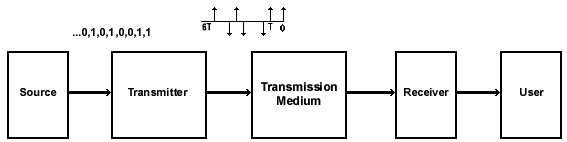
Figure 1-10: Binary data from source represented by impulse train put into transmission medium by transmitter. Impulses are T seconds apart.
Now what comes out at the Receiver in response to the positive impulse sent at time zero to represent the binary data bit '1?' An example result is illustrated in Figure 1-11. Notice that this response out of the Transmission Medium to the input impulse is a pulse spread out in time with its center at t seconds, when t is not equal to 0 seconds. While this example output cannot be called typical, it does indicate a property typical of all output signals received from the Transmission Medium: the time spreading of the output pulse, called "time dispersion." Time dispersion is a result of the finite bandwidth of the Transmission Medium. To be exact, it is due to the fact that the transfer function of the Transmission Medium - indeed, of any Transmission Medium - attenuates the higher signals.

Figure 1-11: Input signal is positive impulse. Resulting output signal shows time dispersion
Look closely at the output signal pulse shown in Figure 1-11. Because it is spread in time, it will interfere with the output pulses, due to input data signals which will come after it. These do not appear in the illustration, but the implication should be clear. Likewise, these subsequent data signals will generate output pulses that will also be spread in time. Each will also interfere with both the pulses coming before it and after it. This type of interference is called "intersymbol interference." It is not just a consequence of the input signals being impulses. An input signal, of finite duration and of any shape, will generate an output signal with time dispersion.
As the data rate from the Source increases, the intersymbol interference problem grows worse. Output pulses with time dispersion get squeezed next to one another. The growing level of intersymbol interference makes it increasingly harder for the Receiver to demodulate these signals.
To some extent, the intersymbol interference can be undone by sophisticated signal processing in the Receiver. This usually goes under the name of "equalization." However, in many cases equalization still cannot deliver the data from the Receiver with the BER required by the Source-User pair. In other cases, the data being generated by the Source, say R BPS, is so high that an equalizer cannot be obtained fast enough to keep up with the output signals.
In considering the data link design task, the first line of defense against time dispersion and intersymbol interference lies in the proper selection of the Transmission Medium. The larger the bandwidth of the Transmission Medium, the fewer high frequency components will be attenuated during propagation and the smaller the time dispersion. As a result, there will be less interference between different output pulses. Make no mistake. Intersymbol interference will not disappear. Rather, it will be lessened and made more tolerable as the bandwidth grows larger. In particular, to lessen the intersymbol interference the bandwidth of the Transmission Medium must get larger in relation to the Source's generated bit rate, R BPS.In considering the data link design task, the first line of defense against time dispersion and intersymbol interference lies in the proper selection of the Transmission Medium. The larger the bandwidth of the Transmission Medium, the fewer high frequency components will be attenuated during propagation and the smaller the time dispersion. As a result, there will be less interference between different output pulses. Make no mistake. Intersymbol interference will not disappear. Rather, it will be lessened and made more tolerable as the bandwidth grows larger. In particular, to lessen the intersymbol interference the bandwidth of the Transmission Medium must get larger in relation to the Source's generated bit rate, R BPS.
The Transmission Medium must be selected to accommodate the bit rate generated by the Source. It must have sufficient bandwidth so that it will generate tolerable intersymbol interference at the Receiver. This means selecting a Transmission Medium that has a bandwidth that is some multiple of the bit rate, R. A number of rules of thumb are often used to do this. However, they are too specific and not worth discussing at this point, particularly as the measure of bandwidth is subjective. The important point is that the selection of Transmission Medium candidates is limited to those matched to the data rate requirement, R. This means that as R increases, the selection of Transmission Medium candidates becomes more limited.
The information technology explosion in the world has made this selection task ever more challenging. Continuously, PCs are becoming more powerful. More complex applications programs can be run and are finding their way into easily usable software. As a result, the Source bit rate requirement is growing geometrically every few years. To put this in perspective, consider that just ten years ago a Transmission Medium would have been quite acceptable if it had a bandwidth matched to a Source bit rate of 9,600 BPS. This source rate was typical of that generated by most data equipment applications. Today, with the growing demand for video services and the plethora of graphics in computer applications, the demand more often than not is for a Transmission Medium with a bandwidth requirement matched to Source bit rates well upwards of 1 MBPS, possibly 1 GBPS.
You may be able to find the ideal Transmission Medium relative to attenuation, interference and bandwidth. Yet you still may not be able to select it as part of the solution to the data link design problem for the simple reason that it costs too much. It presents an expense beyond the budget allowed for the Source-User communications.
This is nothing new or revolutionary. Money does not drive the world, but it does have a tremendous influence on the ultimate choice of solution to any problem based in technology. This is as true today at the turn of the millenium as it was at the turn of the twentieth century.
As a case in point, let us examine briefly the fiber optic solution to the problems of attenuation, interference and bandwidth. Fiber optic cable - at least, that of the pure glass-silica variety (glass core with glass cladding) - has a far lower attenuation rate than coaxial cable. Whether it is fabricated fully from glass or uses plastic cladding, fiber optic cable can carry signals with full immunity from electromagnetic-based forms of noise and interference. In terms of bandwidth, fiber optic cable has superiority over copper of several orders of magnitude - transmitting well above 10 MHz for up to 4 km. In some cases, dependent on distance and repeaters, it can transmit data at rates measurable in gigabits per second (1 billion bits per second - GBPS) or even terabits per second (1 trillion bits per second - TBPS). To put this in perspective, unshielded twisted pair copper cable transmitting over a distance of 4 km can support 0-to-100 MBPS, while coaxial cable can support about 20 MBPS over the same distance. Thus in terms of attenuation, interference and bandwidth, fiber optic cable beats copper, hands down.
Fiber optic cable, however, has problems of its own, and cost ranks chief among them. As illustrated in Figure 1-12, fiber is far more expensive than Unshielded Twisted Pair (UTP) copper. If you are starting from scratch, building your premises and its communications infrastructure from the ground up, fiber presents a worthwhile investment - a large investment, to be sure, but one that will eventually pay for itself.

Figure 1-15: Cost trends of common transmission media
Suppose, however, that you are not starting from scratch. In this case, you would have to rip out the old copper infrastructure before you could lay down your new fiber optic cable. Herein lies the problem. UTP copper cable has been the Transmission Medium of choice for nearly one hundred twenty years.. There is a tremendous amount of copper infrastructure already in place at every level, from the home office to the global communications network. The local loop connecting business premises and the telephone central office (CO) runs on copper pairs. For the same reason, copper provides the most common Transmission Medium for Internet access. Simply put: copper is everywhere. As a result, the cost replacing copper with fiber is often prohibitively high.
Another drawback of fiber lies in one of its strengths. Fiber transmits data via lightwaves rather than electrical signals. This cuts down on interference, but it also eliminates one of the benefits that copper grants: the ability to transmit DC voltage along with the signal. This additional voltage allows telephones to continue functioning during a power outage. Without the additional voltage, you risk losing your phones as well as your PCs and peripherals when the lights go out. For this reason alone, it is unlikely fiber will ever replace copper entirely for desktop communications.
This appears to place us at an impasse. Traditional copper is too slow and too vulnerable to cope with the increasingly steep demands of data transmission. Fiber can be too expensive to make a shift practicable, even without its own vulnerability. If only there were a way to marry the cost benefits of copper to the technological advantages of fiber, we would have a really attractive Transmission Medium.
Thankfully, there is and we do. It is called Digital Subscriber Line (DSL) technology.
Necessity is the mother of invention. In the case of DSL, that necessity took the form of the need to eliminate interference - particularly in the form of noise generated by inclement weather, to which analog signals transmitted along copper wire are so vulnerable. Shortly before World War II, a British engineer working for ITT in France grew so annoyed by this analog line noise that he set to work on the problem of how to digitize analog voice signals. The war soon put an end to these experiments, but the increasing globalization of the economy that followed the war led to a demand for constant improvement in telecommunications quality.
AT&T, in conjunction with IBM, carried out much of the basic postwar research on digital telephone technology. These experiments came to focus on a technique of sharing bandwidth in time slots known as "time division multiplexing" (TDM) - a method long-considered too expensive and technically impractical for analog transmission. By the early 1960s, this led to the development of the T-carrier system - the basis of which was a local loop digital system known as T1 (T-carrier, level 1 multiplexing). The T-carrier system led to the development of digital trunk lines. By the mid-1970s, digital trunk lines had become commonplace and digital switches made their first appearances. Through this period, T1 remained under the control of the sole public switched telephone network (PSTN), AT&T.
Early digital telecommunications enthusiasts predicted the growth of an integrated digital network, a technology that later came to be called Integrated Services Digital Network (ISDN). Skeptics, noting the failure of the digital promise to produce through the 1970s, joked that the acronym really stood for "It Still Does Nothing".. By 1981, however, ISDN began meeting initial expectations, and 1982 saw ISDN form the core of the original DSL technology: IDSL (ISDN DSL).
Two years later, the US Government ordered the divestiture of AT&T. With the breakup of the PSTN, T1 first became available for customer installation and DSL technological development exploded. This explosion fed and was itself nourished by the rapid advances in computer technology and the development of the Internet over the next decade, both of which demanded increasingly higher rates of data transmission. ISDN, so long in coming, soon found itself surpassed by newer flavors of DSL, particularly High-bit-rate DSL (HDSL, developed between 1988-91), Asymmetric DSL (ADSL, developed between 1991-95), and Very-high-bit-rate DSL (VDSL, under development since 1995). The universe of DSL technology referred to collectively as xDSL, now forms a key ingredient of the asphalt that makes up the Information Superhighway.
This book has been written so that each chapter stands on its own. There is no need to read the chapters in order. While there may occasionally be cross-references from one chapter to another, the information can be gleaned easily without going back to the very beginning.
A brief summary of the succeeding chapters follows:
Chapter 2 - We examine first the basic technological architecture underlying the
DSL modem. With this foundation, we shall follow with a study of the various different flavors of xDSL modems that have appeared over the past two decades, along with their specifications and uses. These flavors include: ISDN DSL (IDSL), Asymmetric DSL (ADSL), Single-line or Symmetric DSL (SDSL), Rate Adaptive DSL (RADSL), Universal ADSL (UADSL, also known as
G. Lite or DSL Lite), Consumer DSL (CDSL), Moderate Speed DSL (MSDSL), High-bit-rate DSL and High-bit-rate DSL 2 (HDSL/HDSL2), and Very-high-bit-rate DSL (VDSL).
Chapter 3 - The DSL modem is only half the system that allows you to convert your copper
local loop into a high-speed data transmission channel. The other half lies at the CO, the platform that gathers together signals from DSL and traditional POTS, combines them in a digital signal and dispatches them down the line to the destination CO. This is the Multiservices Digital Subscriber Line Access Multiplexer (DSLAM), which we shall discuss here.
Chapter 4 - This section deals with the testing of DSL modems and, as such, should be of special interest to manufacturers. Theoretically, there are several ways to test your modem's specifications: testing on the local loop itself, on a wire coil, and on a DSL
simulator. The simulator overcomes difficulties of space and distance constraints, crosstalk and mutual inductance - difficulties that afflict the first two methods of testing - by combining real world operational factors with
laboratory convenience. As such, it presents the manufacturer with the most realistic testing environment for a DSL product.
Chapter 5 - This section enumerates standards that cover the use of DSL technology, providing the names and contact information of organizations from which these standards can be ordered.
Chapter 6 - A glossary that covers the subject of digital subscriber line technology. It provides terminology specifically covered in this book, as well as terminology that may be encountered in the broader realm of communications in general.
In analog data communication along the PSTN, a voice-band modem converts data from a piece of terminal equipment into electronic signals in the 200 Hz to 3.4 kHz frequency band. This allows the existing public network to transmit electronic data in the same way it traditionally would a human voice. In the early decades of data communication, this was not so much of a problem. However, as modems have evolved to transmit and receive data at ever-higher speeds, and as software has evolved to carry ever more complex forms of information, data communication presses up against the physical limitations of the copper medium. The bandwidth of 200-3400 Hz is simply too narrow to fit this data comfortably. The result is a communications bottleneck. Downloading a web page becomes an increasingly cumbersome process the more detailed its graphics are. Try to connect to a web page that features animation - or worse yet, video footage - and your computer will slow to a crawl.
DSL frees the end-user from the limitations of voice bandwidth, providing bandwidth measured in the hundreds of kilohertz and enabling communications at least 100 times faster than that available over pure POTS, while still allowing you to make phone calls while your PC or fax is transmitting or receiving. Let us examine a typical DSL modem to see how it accomplishes this.

Figure 2-1: A Typical DSL Transceiver Block Diagram
The DSL chip set includes both analog and digital components. Among the analog components are analog transmit and receiver filters, the Digital to Analog Converter (DAC), the Analog to Digital Converter (ADC), and the automatic gain device (to adjust the received signal level to that which is suitable to the input of the ADC).
The modulation/demodulation function of the DSL transceiver, the modem proper, is digital. Modulation defines the process of converting each successive data symbol vector - in this case, a DSL input bit - into a continuous time analog signal that represents the message corresponding to each successive group of bits. At the far end of the transmission, the receiving DSL unit converts these analog signals back into bit form, hence "demodulation." Subsumed within the modulation/demodulation function are such aspects of digital signal processing as echo cancellation, adaptive channel equalizing, symbol/bit conversion, timing recovery, constellation mapping. In the cases of Carrierless AM/PM (CAP) or Quadrature Amplitude Modulation (QAM) line codes, the modem also provides the digital shaping filter, while in the case of Discrete MultiTone (DMT) line code, the modem includes Fast Fourier Transform (FFT) and Inverse Fast Fourier Transform (IFFT).
This brings us to the other major digital function of the DSL chip set, coding/decoding - performed by a part of the transceiver prosaically-known as the encoder. The task of the encoder is to map data bits from a digital bit stream prior to modulation and transmission. The importance of coding varies depending on the flavor of xDSL in use. Earlier DSLs, such as IDSL and HDSL, require no coding at all. Later DSLs, ADSL for example, can use Reed-Solomon codes, trellis codes or both. In the most recent generation of DSL systems, HDSL2 being the prime example, coding forms a critical part of the DSL transceiver. The relationship of the encoder to the modulator in transmission appears below in Figure 2-2.

Figure 2-2: Transmitter of a digital transmission system
Besides the DSL chip set, but there are two other components our hypothetical DSL transceiver may contain. The first element is the hybrid circuit, an interface converter for conversion from four-wire, dual half-duplex to two-wire full-duplex. The second element is the POTS splitter, a low-pass filter that separates the voice channel out from the DSL communication spectrum. The POTS splitter thus allows you to use your phone line as a phone line while simultaneously using it for data communication via modem, fax machine, or other terminal equipment.
These, then, are the bare bones of an average DSL modem. The modem connects the customer premises to the local loop, the actual digital subscriber line. The digital signal may require regeneration while traveling along the local loop, a process carried out by repeaters. At the far end of the local loop lies the central office, the CO, where another DSL modem will pick up the digital transmission. A bird's eye view of this generic DSL architecture appears below in Figure 2-3.

| Central Office - Building where local loops connect to transmission links. |
| LT: Line Termination - Building where local loops connect to transmission and switching equipment. |
| Local Loop - Telephone wire connecting the CO to the customer premises. |
| MDF: Main Distributing Frame - Wire cross-connection field used to any loop to any Central Office equipment. |
| NID: Network Interface Device - Point of demarcation between the customer installation and the telephone company outside wire. |
| NT: Network Termination - DSL Modem at the customer end of the local loop. |
| Repeater - Signal regeneration device located near the midpoint of a cable. |
| TE: Terminal Equipment - End user equipment such as a personal computer or a telephone. |
Figure 2-3: Generic DSL Reference Model
As we will discover, however, terms like "average" and "generic" must be applied very carefully when referring to DSL technology. There exists a veritable alphabet soup of DSL modems, with more combinations of letters clumping together all the time. Let's grab our spoons and taste a few.
There are nearly a dozen different types or "flavors" of DSL modem currently in existence or in development. We will now examine each type with respect to its transmission capabilities and limitations.
Between 1982 and 1988, the American National Standards Institute, better known as ANSI, developed the standards that defined IDSL (ISDN DSL) communications. IDSL functions on the Basic Rate Interface (BRI) model of ISDN - also known as 2B+D - which provides an overall data transmission rate of 144 KBPS. The two B (bearer) channels are circuit switched and can carry 64 KBPS of either voice or data in either direction. The D (data) channel carries control signals and customer call data in a packet-switched mode, operating at 16 KBPS. Remaining throughput is absorbed by Operational, Administrative, Maintenance and Provisioning (OAM&P) channels.
IDSL runs on a single pair of wires at a maximum distance of 18 kilofeet (kft) - roughly 3.4 miles/5.4 km. What differentiates IDSL from traditional ISDN is that ISDN requires connection through a CO voice switch. IDSL runs directly through xDSL equipment, rendering unnecessary the expensive upgrades to CO switches which ISDN otherwise demands. For this reason, IDSL is sometimes known as "BRI without the switch."
A variant on IDSL relies on the Primary Rate Interface (PRI) model, using a single D channel at 64 KBPS and some 23 to 30 B channels. In this variant, the channels are bonded to form higher bit rates, providing a theoretical capacity of up to 768 KBPS.
2.2.2 The HDSL Family: HDSL, SDSL, MSDSL and HDSL2
The search for a more cost-effective route to provide PRI bandwidths on local loops also led to the development of an entirely new flavor of DSL. AT&T Bell Laboratories and Bellcore developed the concept High-bit-rate DSL (HDSL) in late 1986. Prototype HDSL systems first appeared in 1989 and became commercially available three years later. In technical terms, HDSL is a dual-duplex repeaterless T1 technology. This means that HDSL transmits data symmetrically over two pairs of wire at the standard T1 data rate of 1.544 MBPS (each pair carrying 784 KBPS), an order of magnitude faster than IDSL. By itself, T1 transmission requires a repeater every 6000 feet to "clean up" and relay the digital signal to its destination, a requirement that often made such transmission too expensive for the average customer.

Figure 2-4: T1 Components
HDSL overcomes this limitation using a line code adapted from IDSL called 2B1Q (Two Binary, one Quaternary). The 2B1Q code compresses two binary bits of data into one time state as a four-level code. This doubles the effective range of T1 transmission from 6,000 to 12,000 feet without repetition, slicing the cost of T1 communication, with a side benefit of reducing crosstalk. In its original form, HDSL required addition of a third wire pair to bring the data rate up to E1 levels (2.048 MBPS).
The primary use of HDSL is to provide companies and individuals with Internet access to servers, but not just from clients. Additional applications include providing links on private campus networks with installed copper cable plant, video conferencing and distance learning applications, providing PRI for ISDN, extending central PBX to other office park locations, providing LAN extensions and connections to fiber rings and providing wireless system base station connections.

Figure 2-5: The HDSL Architecture
Multiple pairs of wires can prove troublesome when it comes to digitizing the analog local loop for residential service, as opposed to commercial premises. Using a single pair proves less troublesome. The result has been an offshoot or little brother of HDSL, the basic version of which runs at 784 KBPS, full-duplex on a single pair of wires. This flavor is known as SDSL, standing either for Symmetric DSL or Single-pair DSL, depending on the source. Since its introduction, SDSL has developed various incarnations, with the data rate varying inversely to the maximum distance. One proprietary form of SDSL is Multirate Symmetric DSL (MSDSL). To confuse matters further, MSDSL is also sometimes referred to simply as "MDSL," for Multirate DSL, an acronym shared by a form of Asymmetric DSL technology.
| SDSL Data Rate (KBPS) |
Maximum (feet) |
Distance (km) |
|---|---|---|
| 128 | 22,000 | 6.71 |
| 256 | 21,500 | 6.56 |
| 384 | 14,500 | 4.42 |
| 768 | 13,000 | 3.97 |
| 1,024 | 11,500 | 3.51 |
Table 2-1: SDSL Speeds and Distances
Another variation of HDSL, recently standardized, is HDSL2. Like SDSL, it functions on a single, full-duplex twisted pair. Unlike SDSL, it can transmit the full T1 (1.544 MBPS) or E1 (2.048 MBPS) at a distance of up to 12 kft without repeaters. The downside is that HDSL2 - designed for the T1/E1 leased line business market, rather than the residential market - does not include voice circuit support.
Subsequent to the printing of this book, a new flavor of HDSL, called SHDSL, has emerged. It is the first standardized multi-rate symmetric DSL and is designed to transport symmetrical data across a single copper pair at data rates from 192 KBPS to 2.3 MBPS or 384 KBPS to 4.6 MBPS over two pairs. Refer to the chart in Figure 2-9.
2.2.3 The ADSL Family: ADSL, MDSL, RADSL and Splitterless DSL
All the flavors of DSL we have examined thus far have one facet in common: they all have the same rate of data transmission downstream (from service provider to customer) as upstream (from customer to service provider). There are a number of applications for DSL, however, in which the data traffic downstream tends to be much heavier than requests for data sent back upstream. This is especially true for Video-on-Demand (VOD), but also holds true for Internet access (particularly on the World Wide Web) and LAN bridging. It follows that a DSL used for these applications could allocate bandwidth more efficiently were it able to transmit data asymmetrically, accelerating data transmission downstream at the cost of upstream transmission speed. This would have the additional benefit of reducing near-end crosstalk (NEXT).
This is the guiding concept behind Asymmetric DSL (ADSL). The early concept for ADSL originated in 1989, while HDSL was still in the prototype phase, under J.W. Lechleider and others at Bellcore. Stanford University and AT&T Bell Labs developed ADSL from concept to prototype between 1990 and 1992, with field technology trials beginning three years later. The International Telecommunications Union (ITU) gave determination to a set of ADSL recommendations in October 1998.
ADSL employs one of two modulation techniques, CAP and DMT. CAP is "Combined Amplitude Phase Modulation." DMT is "Discrete Multi-Tone Modulation." DMT has recently been adopted as the ADSL standard.
ADSL has a downstream transmission rate of between 1 and 9 MBPS, with an upstream transmission rate of between 64 KBPS and 1 MBPS and can operate at distances up to 18 kft. ADSL also allows the use of standard voice telephony in addition to data transmission, by the use of a POTS splitter. With the splitter, data transmission and POTS flow through the same line, with the digital transmission restricted to a frequency band above that of voice telephony. In physical terms, voice-band signals are attached to the red and green inside wires to the telephone, while wideband signals attach to the yellow and black inside wires to the customer's ADSL. A low-pass filter (LPF) for the voice wiring is placed at or near the customer premises' Network Interface Device (NID), while a high-pass filter is installed in the customer's ADSL modem-proper (ATU-R) for higher frequency data.
Subsequent to the printing of this book, new flavors of ADSL have emerged, including ADSL2+ and ADSL2++, capable of doubling the transmission speed of typical ADSL connections to 2.2 MHz and 4.5 MHz, respectively. Both are backwards compatible to ADSL and provide improved reach. Refer to the chart in Figure 2-9 for a comparison.

Figure 2-6: ADSL Reference Model

Figure 2-7: Conventional ADSL Configuration with Splitter
ADSL has already generated a number of offshoots, such as Medium-bit-rate DSL - MDSL, not to be confused with the symmetric DSL that sometimes goes by that acronym. MDSL evolved as a way to provide a less complex, less expensive ADSL modem. The tradeoff is speed. The downstream data transmission rate for MDSL is only 800 KBPS to 1 MBPS; its upstream rate, a mere 100 KBPS.
Another version of ADSL is Rate-Adaptive DSL (RADSL). In some situations, line conditions or sensitivity to environmental changes may interfere with operation at the assumed optimum speed. RADSL compensates for such hazards, adjusting the operating rate to the highest possible for the local loop. On average local loops, RADSL may have a downstream rate of 7 to 10 MBPS and an upstream rate of 512 to 900 KBPS. On long loops (18 kft or more), RADSL operates downstream at about 512 KBPS and 128 KBPS upstream. RADSL, like ADSL, makes use of a POTS splitter to separate ADSL from voice-band transmission.
For all the advantages the POTS splitter grants, however, it also carries the disadvantage of requiring the setup of extra premises wiring, as existing substandard wiring will degrade ADSL performance. Further, the shifting of ADSL transmission to higher frequency bands to accommodate POTS reduces ADSL data rates and loop reach. Splitterless DSL, recently standardized, solves this problem.
Splitterless DSL goes by a plethora of different trade names, including Commercial DSL (CDSL), Universal ADSL (UDSL or UADSL), DSL Lite and G.Lite (for ITU Recommendation G.992.2, which governs this flavor). To call this flavor "splitterless" is actually something of a misnomer. Rather than eliminating the need for a splitter altogether, it allows the line to be split at the CO end of the connection. This takes much of the burden off the customer, who can now have ADSL service merely by plugging an ADSL modem into a phone jack, without the need for extensive premises rewiring or splitter installation. This makes splitterless DSL both simpler and less expensive than earlier versions of ADSL. Now that it has become standardized, it is expected to become the dominant version. Splitterless DSL carries downstream data transmissions at 1 MBPS to 6 MBPS and upstream transmissions at 128 KBPS to 384 KBPS.
Very-high-bit-rate DSL (VDSL) is the newest flavor of DSL technology and has been in development since late 1995. Unlike its various elder siblings, VDSL has the option of either symmetric or asymmetric transmission. The highest symmetric rate proposed would leave current HDSL modems in the dust, zipping data transmission along at 26 MBPS. The asymmetric rates currently under consideration vary from 13 MBPS downstream/1.6 MBPS upstream, to 26 MBPS downstream/3.2 MBPS upstream, to an incredible 52 MBPS downstream/6.4 MBPS upstream. The tradeoff for these fantastic transmission speeds is in distance. VDSL only has a service range of 1.5 to 4.5 kilofeet, restricting its usefulness. For this reason, VDSL technology is targeted for use as the last link in fiber in the loop (FITL), fiber to the curb (FTTC) and fiber to the neighborhood (FTTN) networks. Like ADSL, VDSL allows for the coexistence of digital and POTS transmission on the same twisted pair by use of a POTS splitter.
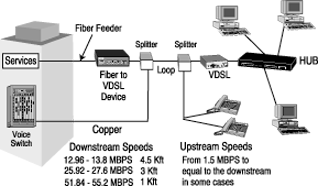
Figure 2-8: The VDSL Architecture

Figure 2-9: Sampling technologies and related bandwidths
This accounts for all the major, and quite a few of the minor, flavors of DSL modem currently on the market. However, there is one more device we require before our digital transmissions can make the leap from the CO to the end-user destination: the Digital Subscriber Line Access Multiplexer, or DSLAM.
We have now followed the path of data along the digital subscriber line from its commercial or residential source, via the local loop, to the CO. The local loop here terminates at the Main Distribution Frame (MDF), to be picked up by one of the CO's many DSL modems. If the form of DSL allows for the carrying of both analog and digital signals, a POTS splitter will separate out the signals. The analog signal will follow its time-honored path along the copper-wire infrastructure. For the digital signal, however, one step before the signal can be shot along to its destination.
The CO must now collect all the disparate digital signals from its modems and combine them into a single signal, via multiplexing. The aggregate signal then loads onto backbone switching equipment, traveling through an access network (AN) - also known as a Network Service Provider (NSP) - at speeds of up to 1 GBPS and emerging at a destination CO. At this point, the signal is then fragmented into its component parts and transmitted via telco modems to its final residential or commercial receivers. The device that performs these functions of signal combination and fragmentation is called the Digital Subscriber Line Access Multiplexer, or DSLAM.
The average DSL customer will never have to purchase a DSLAM. For the CO looking to make itself DSL-compatible, there are a number of features to consider in selecting which DSLAM best suits your needs and the needs of your subscribers. Alternatively, if you plan to enter the market of DSLAM manufacturers, these are features you should consider in constructing your product.
Chiefly, there is the question of multiservices support. As mentioned in the previous chapter, DSL technology is evolving at lightning speed. A DSLAM is a massive investment. To obtain the best value for your dollar, you should seek (or design) a system that allows for adaptation in the face of increasing application diversity. A similar concern is that of DSL code support: make sure your prospective DSLAM is flexible in the matter of line code and line protocol deployment. Remember that the newer flavors of DSL are particularly dependent on coding for proper transceiver functioning, and a good DSLAM should reflect this. Your DSLAM should also meet compatibility requirements for the various Network Management Systems (NMS) platforms, for better control and monitoring of performance.
Apart from these internal concerns, there are also two external, hardware-related issues that bear on DSLAM selection. The first is DSLAM line aggregation. The more DSL lines you can aggregate on a single output for network connection to a DSLAM, the greater the economy of space and scale. The greater the savings, the more cheaply you can supply your customers with DSL services and the more potential DSL subscribers you will have. Second is maintainability. The fastest, most flexible DSLAM in the world will fall to pieces rapidly if it is denied proper upkeep. To protect yourself against this, make sure your prospective DSLAM meets Network Equipment Building System (NEBS) standards of compliance.

Figure 3-1: DSL-based Services Reference Diagram
You are in the process of developing a new line of xDSL modems. The modem has gone from the drawing board to the prototype stage. Before you put the new modem into production, however - before you commit to a massive investment of man-hours and parts - it would help to know whether the unit performs as it was designed to or whether it still has some kinks to be eliminated. You will want to know just how well the modem performs on the local loop.
Consider another scenario. You have just purchased a new DSL modem. It has been touted as the most advanced of its kind on the market. Possibly it represents a new flavor of xDSL modem entirely. In any case, you take a look at the new modem's spec sheet and are skeptical as to whether it can perform as well as its manufacturers claim. You want to put it through its paces and see how it measures up.
In either case, there are three methods by which you can test your DSL modem's performance. All three methods of testing boil down to an examination of the BER performance of the modem over the local loop at a specific distance and in a specific interference environment.
The first method is to use the local loop itself, set up with your local telco. This is a real world test, throwing the modem into the deep end and watching whether it will sink or swim. Unfortunately, it does not provide the most reliable measure of performance. The "live" local loop you use for the test is not necessarily representative of the parameters within which the modem must function "in the field." You will have no control over, and in some cases no knowledge of, the loop length. The level and type of interference on the line will also be outside your capability to gauge. These operating factors apart, a local loop for testing is physically awkward in a manufacturing environment.

Figure 4-1: Diagram of modem testing on local loop connection
A second method is to test your modem on a coil of twisted pair cable, with the cable mimicking a local loop. This testing method has the advantage of being inexpensive. It allows you to simulate the attenuation and delay of the local loop, further allowing you to measure accurately the loop length. What it cannot do is simulate interference. It ignores the effects of crosstalk. And it too is physically awkward in the manufacturing environment. Coiled cable is bulky and difficult to fit on a laboratory bench. Multiple coils can take up considerable workspace.

Figure 4-2: Diagram of modem testing on coil of twisted pair cable
The third method is to use test equipment specifically designed to measure the capabilities of your DSL modem, a tool known as the "DSL simulator." As its name implies, the simulator can do what the local loop and cable coil tests cannot: accurately represent attenuation, delay and multiple types of interference over a variety of loop lengths. Like the communications media they are meant to mimic, simulators come in both digital and analog. The digital simulators rely on a format known as Digital Signal Processing (DSP). The DSP-based simulator performs its tests via chips and microprocessors, running programs that provide a digital filter approximation.
DSP-based simulation, unfortunately, shares the problem of space constraint with local loop and wire coil testing. The current generation of digital simulators, while suitable for laboratory use, are too large for bench-level use. Furthermore, DSP-based simulators are costly, running into the tens of thousands of dollars, a prohibitive expense in a factory space demanding multiple test devices. As such, the DSP-based simulator tends to be impractical for use in the manufacturing environment.
This brings us to the analog alternative. Analog DSL simulation relies on lumped, linear, bilateral, passive electrical filters composed of resistors, capacitors and inductors. These tried-and-true electrical components provide an analog approximation of loop conditions. Ironically, analog DSL simulation is much cheaper and more compact than digital DSL simulation.

Figure 4-3: Example of modem testing on DSL Simulator, featuring Telebyte's Model 458-2SL and Model 4801

Figure 4-4: Model 459-A High-Density/Production Local Loop Simulator
The sleek design, reliability and low cost of the Telebyte Model 459-A makes it the right choice for the production test environment. In addition, loop lengths are programmable from 4 kft to 22 kft, in 2-kft increments (plus 26 kft). The Model 459-A is ideally suited to test DMT DLSAM channels and modems. The Model 459-A simulates 26 AWG PIC and offers the bandwidth requirements for xDSL technologies such as ADSL, G.Lite, HDSL, HDSL2, G.SHDSL (Annex 1) and SDSL.

Figure 4-5: Model 458 Multi-Channel Local Loop Simulator
The Telebyte Model 458 Multi-Channel Local Loop Simulator provides a wide variety of configurations through use of up to 16 plug-in Line Modules. It is ideally suited for testing DSL modems and other bandwidth-compliant telecom devices in a high-volume production line environment. The 458 Control Module interfaces with a controlling PC or terminal via IEEE-488 or RS-232 to control loop-length settings. A user-friendly interface or Common user-command language may be used for control. The Model 458 simulates 26 AWG PIC and offers the bandwidth requirements for xDSL technologies such as ADSL, G.Lite, HDSL, HDSL2, G.SHDSL (Annex 1) and SDSL.

Figure 4-6: Model 458-2SL Multi-Channel Local Loop Simulator
This compact unit is extremely easy to use and a perfect fit when only one or two-channel operation is required. Telebyte Model 458-2SL Multi-Channel Local Loop Simulator is ideally suited for testing DSL modems and other bandwidth-compliant telecom devices in a high-volume production line environment. When used in conjunction with one to two 458 Line Modules, it becomes a two-channel local loop simulator. The built-in Control Module interfaces with a PC or terminal via IEEE-488 or RS-232 to control loop-length settings or it can be used as a stand-alone unit. User-command language may be used for control. In addition, line length is displayed on the front of the unit and can be set via a rotary encoder.
Additional Features:

Figure 4-7: A wide variety of Model 458 Line Modules plug into the 458 and 458-2SL card cages.
| Line Module | Technology | Cable | Lengths/Increments | Bandwidth |
| 458-LM-20 | ADSL, ADSL2, ADSL Lite ISDN, G.lite | 26 AWG PIC Insulation | 0-20.5 kft/500 ft | DC to 1.5 MHz |
| 458-LM-J20 | ADSL Japan | 0.4 mm Paper Insulation | 0-6.15 km/150 m | DC to 1.1 MHz |
| 458-LM-E20 | ADSL, ISDN, SHDSL/G.SHDSL (Annex A) | 0.4 mm PE Insulation | 0-6.15 km/150 m | DC to 1.5 MHz |
| 458-LM-HD | ADSL2++ | 26 AWG PIC |
Channel 1: 0 - 31,750 ft/250 ft Channel 2-8: 0-30,000 ft/2,000 ft |
DC to 4.5 MHz |
| 458-LM-HDE | ADSL2++ | 0.4 mm PE |
Channel 1: 0 - 9,450/150 m Channel 2-8: 0-9,000/600 m |
DC to 4.5 MHz |
| 458-LM-HDJ | ADSL2++ | 0.4 mm Paper | 0 km to 7.5 km/500-m | DC to 4.0 MHz |
| 458-LM-JSM | ADSL | 0.4 mm Paper Insulation | 0-1.55 km/50 m | DC to 1.1 MHz |

Figure 4-8: Model 460-V High-Density/Production VDSL Local Loop Simulator
Introducing the industry's first VDSL Local Loop Simulator. Ideally suited for the functional production testing of VDSL devices, this compact and reliable unit accurately simulates attenuation and impedance characteristics of 26 AWG and provides up to 24 channels in a 2-U high rack-mountable chassis. Loop lengths are programmable from 0 to 5,500 ft in 500-ft increments, bandwidth ranges from 100 kHz to 12 MHz and the 460-V can be remotely controlled via RS-232.
Other Products Related to DSL Simulation:

Figure 4-9: Model 4801 Universal xDSL Noise/Interference Simulator (8-slot version shown)
The innovative Model 4801 Universal xDSL
Noise/Interference Simulator features the lowest noise floor
of any noise simulator on the market today. This
highly-advanced system allows manufacturers of today’s xDSL
technologies to test signaling devices such as transceivers
and DSLAMs with ease and accuracy. Our design uses unique
technology to achieve real-life noise simulation, allowing
for accurate and repeatable testing. Reduce clutter with
this all-in-one unit that includes a powerful built-in PC,
eliminating the need to add a PC to the test configuration.
The Universal xDSL Noise/Interference Simulator seamlessly
integrates with our outstanding line of wire line (local
loop) simulators for the ultimate in affordability, accuracy
and ease of use. Modular design allows for a system that can
be expanded as needed.

Figure 4-10: Model 4101-J Japanese ADSL+ Test Loop Simulator
The 4101-J supports TCM loops 2 and 5 and is fully compliant with NTT’s proposed amendment to ITU-T for ADSL+. The system also meets NTT Laboratory’s expanded requirements for attenuation accuracy and loop length increments. This device will operate from DC to 4 MHz. The 4101-J can be controlled by a PC or terminal via IEEE-488 or RS-232 to control loop-length settings. Control can be accomplished by using the supplied GUI or through the use of scripts.
Any network architecture must follow some set of protocols. On the one hand, the set of protocols may be homegrown - that is, specified by the designer of the network. On the other hand, the set of protocols may conform to a recognized, published set of standards.
Each flavor of DSL has its own set of standards to which it conforms, a situation made all the more complex in symmetric DSL by the difference in standard transmission speed between North America (T1, 1.544 MBPS) and Europe (E1, 2.048 MBPS).
A discussion of these published standards is well beyond the scope of the present work. However, the interested reader may order them from several sources. Several are listed below. When calling these organizations, it will be worth your while both to order a catalog and to request inclusion on their update services. This will allow you to keep informed of new standards and of supplements to existing ones as they are approved.
| ADSL Forum | The ADSL Forum |
|---|---|
| 39355 California Street, Suite 307 | |
| Fremont, CA 94538 | |
| Internet: www.adsl.com | |
| Tel: (510) 608-5905 | |
| Fax: (510) 608-5917 |
| ANSI | American National Standards Institute (ANSI) |
|---|---|
| 11 West 42nd Street | |
| New York, N Y 10036 | |
| Internet: www.ansi.org | |
| Tel: (212) 642-4900 | |
| Fax: (212) 398-0023 |
| Bellcore | Direct Sales |
|---|---|
| Telcordia Technologies, Inc. [Formerly Bellcore] | |
| 8 Corporate Place, PYA 3A-184 | |
| Piscataway, NJ 08854-4156 | |
| Internet: www.telcordia.com | |
| Tel: (800) 521-2673 (U.S. and Canada) | |
| Tel: (732) 699-5800 (International) | |
| Fax: (732) 336-2559 |
| ETSI | European Telecommunications Standards Institute (ETSI) |
|---|---|
| 650 route des Lucioles | |
| 06921 Sophia Antipolis Cedex | |
| France | |
| Internet: www.etsi.org | |
| Tel: +33 (0) 4 92 94 43 95/43 64 | |
| Fax: +33 (0) 4 93 65 47 16 |
| IEEE | IEEE Customer Service |
|---|---|
| 445 Hoes Lane | |
| PO Box 1331 | |
| Piscataway, NJ 08855-1331 | |
| Internet: www.ieee.com | |
| Tel: (800) 678-4333 | |
| Tel: (908) 562-1393 | |
| Fax: (908) 981-9667 |
| ITU | International Telecommunication Union (ITU) |
|---|---|
| Telecommunications Standardization Bureau (TSB) | |
| Place des Nations | |
| CH-1211 Geneva 20 | |
| Switzerland | |
| Internet: www.itu.int | |
| Tel: +41 22 730 5857 or +41 22 730 5859 | |
| Fax: +41 22 730 5853 |
| VDSL | The VDSL Coalition |
|---|---|
| The VDSL Coalition is a group of leading semi-conductor, modem, and communications-network equipment firms and network operators who are committed to support the development of Very-High-Speed Digital Subscriber Line (VDSL) standards for the next generation of telecommunications applications. | |
| Internet: http://www.vdslcoalition.net |
# | A | B | C | D | E | F | G | H | I | J | K | L | M | N | O | P | Q | R | S | T | U | V | W | X
2B + D - The basic rate interface (BRI) in ISDN. A single ISDN circuit divided into two 64 digital B channels for voice and data and one 16 D channel for low-speed data and signaling. Either one or both of the 64 channels may be used for voice or data. In ISDN, 2B + D is carried on one or two pairs of wires (depending on the interface). See also BRI.
2B1Q - Two Binary, one Quaternary. A line coding technique that compresses two binary bits of data into one time state as a four-level code.
3B2T - A baseband line code where three binary bits are encoded into two ternary symbols.
4B3T - A baseband line code where four binary bits are encoded into three ternary symbols.
5ESS - A digital central office switching system made by AT&T.
10Base-T - A 10 MBPS Ethernet LAN that runs over twisted pair wiring. This network interface was originally designed to run over ordinary twisted pair (phone wiring) but is predominantly used with Category 3 or 5 cabling.
100Base-T - A 100 MBPS LAN that maintains backward compatibility with10Base-T networks running at 10 MBPS. Competitor to 100VGAnyLAN.
23B + D - The primary rate interface (PRI) in ISDN. A circuit with a wide range of frequencies that is divided into twenty-three 64 "bearer" channels for carrying voice, data, video, or other information simultaneously and one D "delta" 16 for telephony data. See also PRI (primary rate interface).
-----
AAL5 (ATM Adaption Layer 5) - AAL5 has been adapted by the ATM Forum for a Class of Service called High Speed Data Transfer.
ABCD Parameters - The transfer characteristics of a two-port network describing the input voltage and current to the output voltage and current.
Access Line - The physical telecommunications circuit connecting an end user location with the serving central office in a local network environment. Also called the local loop or "last mile." See also Local Loop.
Access Network - That portion of a public-switched network that connects access nodes to individual subscribers. The access network today is predominantly passive twisted pair copper wiring.
Access Rate - The transmission speed of the physical access circuit between the end-user location and the local network. This is generally measured in bits per second; also called Access speed.
Adapter - See Adapter Card.
Adapter Card - Circuit board or other hardware that provides the physical interface to a communications network; an electronics board installed in a computer which provides network communication capabilities to and from that computer; a card that connects the DTE to the network. Also called a Network Interface Card. See also Data Termination Equipment and Network Interface Card.
ADSL (Asymmetric Digital Subscriber Line) - BellCore term for delivery of digital information over ordinary copper phone lines. ADSL uses a system of frequency division whereby lower frequency POTS signals are delivered to the home unaltered while digital signals traverse the phone line at higher frequencies for delivery to end stations such as a video CODEC or PC. Asymmetric refers to the fact that the downstream (to the user) channels can outweigh the upstream (to the network) channels by a ratio as high as 20:1. This asymmetry is a good fit for video on demand and Internet access applications where the paradigm is a small request up to the network and a large delivery to the user.
ADSL Forum - The organization developing and defining xDSL standards, including those affecting ADSL, SDSL, HDSL, and VDSL. Members participate in committees to vote on ADSL specifications; auditing members receive marketing and technical documentation.
AFE (Analog Front End) - Functions including the analog-digital conversation, analog filter, and line driver.
AGC (Automatic Gain Control) - Receiver adaptation to the received signal level so as to reduce dynamic range of the signal input to the analog-to-digital converter.
AIX (Advanced Interactive Executive) - IBM's implementation of UNIX.
Always On - Current dial-up services require the user to "make a call" to the ISP. The connection is only active during the duration of the call. Most xDSL implementations (including ADSL, UADSL, and SDSL) enable the connection to be always on in a fashion similar to a LAN.
AMI (Alternate Mark Inversion) - Line code, also known as "Bipolar." Used to accommodate the ones density requirements of E1 or T1 lines. Binary information is represented by pulses with three possible amplitudes.
AN (Access Node) - A point on the edge of the access network that concentrates individual access lines into a smaller number of feeder lines. Access nodes may also perform various forms of protocol conversion. Typical access nodes are DLC systems concentrating individual voice lines to T-1 lines, cellular antenna sites, PBXs, and ONUs.
Analog - An electrical signal or wave form in which the amplitude and/or frequency vary continuously. The current basis for most residential telephone service.
Analog Front End - The analog front ends are responsible for converting the digital signal to analog and force the signal onto the twisted pair line.
ANSI (American National Standards Institute) - The primary standards organization for the US. Accredits standards bodies, such as Committee T1 for telecommunications. Member of the ISO.
API - Application Programming Interface.
APON (ATM Passive Optical Network) - A passive optical network running ATM.
ASIC (Application Specific Integrated Circuit) - A chip designed for a specific application. Examples of an ASIC application can be SDSL or other broadband solutions.
Asynchronous Transmission - Data transmission one character at a time to the receiving device, with intervals of varying lengths between transmittals and with start bits at the beginning and stop bits at the end of each character, to control the transmission. In xDSL and in most dial-up modem communications, asynchronous communications are often found in Internet access and remote office applications. See Synchronous transmission.
ATIS (Alliance for Telecommunications Industry Solutions) - Sponsors Standards Committee T1.
ATM (Asynchronous Transfer Mode) - A protocol that packs digital information into 53-byte cells (5-byte header and 48 bytes of payload) that is switched throughout a network over virtual circuits (standardized by the ITUT in 1988 to create a BISDN). Its ability to accommodate multiple types of media (voice, video, and data) makes it a likely player for full service networks based on ADSL and VDSL.
ATM Adaption Layer 5 - A standard adopted by the ATM Forum for a class of service called High Speed Data Transfer.
ATM Cell - An ATM cell is 53 bytes long containing a 5-byte header and a 48-byte payload. The header of an ATM cell contains all necessary information for data to reach the appropriate endpoint. The payload portion of an ATM cell can contain any type of information, be it voice, video, or data.
ATM Connection - An ATM connection is actually one physical connection between two endpoints, that contains multiple VCs. Furthermore, multiple VCs can be grouped to traverse a VP. See also Permanent Virtual Circuit, Switched Virtual Circuit, Virtual Channel Identifier, and Virtual Path Identifier.
ATM Forum - The organization tasked with developing and defining ATM standards. See http://www.atmforum.com for more information.
ATM25 - ATM Forum-defined 25.6 MBPS cell-based user interface based on IBM token ring network.
Attenuation - Signal loss resulting from transversing the transmission medium.
ATU (ADSL Transceiver Unit) - The ADSL Forum uses terminology for DSL equipment based on the ADSL model for which the Forum was originally created. The DSL endpoint is known as the ATU-R and the CO unit is known as the ATU-C. These terms have since come to be used for other types of DSL services, including RADSL, MSDSL and SDSL. ATU now represents xDSL services.
ATU-C (ADSL Transceiver Unit - Central Office) - The ADSL modem or line card that physically terminates an ADSL connection at the telephone service provider's serving central office.
ATU-R (ADSL Transceiver Unit - Remote) - The ADSL modem or PC card that physically terminates an ADSL connection at the end-user's location.
Available Bit Rate - Provides a guaranteed minimum capacity but allows data to be bursted at higher capacities when the network is free.
AWG (American Wire Gauge) - A measure of the thickness of copper, aluminum, and other wiring in the US and elsewhere. Copper cabling typically varies from18 to 26 AWG, the higher the number, the thinner the wire. The thicker the wire, the less susceptible it is to interference. In general, thin wire cannot carry the same amount of electrical current the same distance that thicker wire can.
-----
B8ZS (Bipolar with 8 Zero Substitution) - Line code for T1 transmission. Ones are encoded as pulses of alternating polarity, and eight consecutive zeros are represented by a pulse of the same polarity as the previous pulse.
B Channel - A "bearer" channel is a fundamental component of ISDN interfaces. Carries 64 in either direction, is circuit switched, and can carry either voice or data. See also BRI (basic rate interface), PRI (primary rate interface), and ISDN (Integrated Services Digital Network).
Backbone - Equipment that provides connectivity for users of distributed network and includes the network infrastructure.
Backbone LAN - A transmission facility designed to connect two or more LANs.
Bandwidth - The difference between the highest and lowest frequencies of a band that can be passed by a transmission medium without undo distortion. As a measure of carrying capacity, bandwidth indicates how many bits per second a link can carry, but says nothing about the delay through the network.
Bandwidth Bound - An application, which will not necessarily benefit from lower delay in a network, but can only run properly with a minimum amount of bandwidth at their disposal. A bulk transfer file is a good example of a bandwidth bound application.
Baseband - Using the entire bandwidth of a transmission medium, such as copper cable, to carry a single digital data signal. Note that this limits such transmission to a single form of data transmission, since digital signals are not modulated. See also Broadband.
Basic Encoding Rate - Bit error rate, or the ratio of received bits that are in error; also, a rule for encoding data units described in ANSI. See Bit Error Rate Test.
Baud - Transmission rate of a multilevel-coded system when symbols replace multiple bits. Baud rate is always less than bit rate in such systems.
Bearer Services - A communication connection's capacity to carry voice, circuit, or packet data. The two B channels in a BRI connection are bearer channels. See B Channel, BRI (Basic Rate Interface).
Bell System - Before 1984, the local telephone companies that belonged to AT&T were commonly grouped together as the Bell system. All others were independents. After 1984, it became common to speak of the entire telephone network as the public switched telephone network (PTSN). See ITC (Independent telephone company), PTSN, and RBOC (Regional Bell Operating Company).
Bellcore (Bell Communications Research) - The research arm of the regional telephone companies. Bellcore was part of Bell Laboratories before the breakup of AT&T. Bellcore plays a leading role in developing ISDN standards and other ISDN activities among its member telephone companies.
BER (Bit Error Rate) - Measure of transmission quality indicating the number of bits incorrectly transmitted in a given bit stream compared to the total number of bits transmitted in a given duration of time.
BERT (Bit Error Rate Test) - A test that reflects the ratio of errored bits to the total number transmitted. Usually shown in exponential form (106) to indicate that one out of a certain number of bits are in error.
Binary Eight Zero Suppression - A technique in T-1 that modifies the AMI encoding to ensure minimum pulse density without altering customer data. When eight zeros in a row are detected, a pattern with intentional bipolar violations is substituted. These violations enable the receiving end to detect the pattern and replace the zeros.
Binder Group - Cable pairs are typically arranged under the cable sheath in binder groups. The binder is a spirally wound colored thread or plastic ribbon used to separate and identify cable pairs by means of color-coding. The enclosed pair group is called a binder group. The groups are composed of insulated twisted copper pairs that are also twisted within each binder. Typically they are wrapped in 25 pair bundles. For example, pairs 1-25 might be in one binder group and pairs 26-50 in another. In xDSL, one often hears discussions of signal interference between adjacent pairs within a binder group. The best of all worlds is to keep a data pair separated from another data pair by assigning it to an adjacent binder group. If the data pairs are too close to each other they create what telcos call "disturbers" (i.e., crosstalk). If a "disturber" exists in the binder group serving your SNI, NID, MPOE, etc., you may not "qualify" for DSL service.
Biphase - A baseband line code, also known as the Manchester line code.
Bipolar Return to Zero - A bipolar signal in which each pulse returns to zero amplitude before its time period ends. This prevents the buildup of DC current on the signal line.
Bipolar Violation - The occurrence of two successive pulses of the same polarity in a bipolar signal. In T-1 it is detected as an error.
BISDN (Broadband Integrated Services Digital Network) - A technology suite designed for high-bandwidth multimedia applications and the integration of voice, data, and video. The two transmission types are ATM and STM.
Bit - A contraction of "binary digit." A bit is the smallest element of information in the digital system.
Bit Robbing - A technique in T-1 multiplexing in which the least significant bit (bit 8) of each byte in selected frames is robbed from being used to carry message information and instead is used to carry signaling information.
Bit Stuffing - Extra bit(s) that are conditionally inserted into the frame to adjust the transmitted bit rate.
Blocking - Whenever bits cannot make their way from an input port to an output port in a network node, they are considered to be blocked. In the voice network, the call will not go through. In a data network, the bits may be stored in a buffer or discarded, depending on the situation.
BONDing (Bandwidth ON Demand; sometimes written as BOND-ING or BONDING) - The automatic combining of both B channels into a 128 channel for faster data transfer.
BPS (Bits Per Second) - The raw data rate of a system. Indicates the speed at which bits are transmitted across a data connection.
BRA (Basic Rate Access) - See BRI (Basic Rate Interface).
BRI (Basic Rate Interface) - An ISDN interface typically used by smaller sites and customers. This interface consists of a single 16 KBPS data (or "D") channel plus two 64 KBPS bearer (or "B") channels for voice and/or data for a rate of 144 KBPS. Also known as Basic Rate Access, or BRA.
Bridge - A device that connects two networks of the same type.
Bridge Tap (or Bridged Tap) - A connection of another local loop to the primary local loop. Generally it behaves as an open circuit at DC, but becomes a transmission line stub with adverse effects at high frequency. It is generally harmful to DSL connections and should be removed. Extra phone wiring within one's house is a combination of short bridge taps. A POTS splitter isolates the house wiring and provides a direct path for the DSL signal to pass unimpaired to the ATU-R modem.
Broadband - Sharing the bandwidth of a medium such as copper or fiber optic cable, to carry more than one signal - allowing the integration of voice, video, and data over a single transmission medium. Strictly speaking, a telecommunications link that runs at more than 1.5 MBPS in the US and more than 2 MBPS everywhere else. This is the primary rate of ISDN. Today, most people consider broadband speeds to be much higher, perhaps as high as 5 or 10 MBPS. Includes elements of bandwidth and delay, neither of which can be ignored.
Brouter - A device that can provide the functions of a bridge, router, or both concurrently; a brouter can route one or more protocols, such as TCP/IP and/or XNS, and bridge all other traffic.
Brownout - In the context of DSL, a situation that occurs when a CO (or local exchange) cannot handle all of the calls attempted and even disrupts calls in progress. Also called a "brown down."
Browser - A universal client for accessing information on the World Wide Web portion of the Internet. The development of the browser directly led to the explosion of interest in the Web and indirectly to the current crisis in local access speeds that DSL addresses.
Buffer - A storage area in a computer or other processor's memory dedicated for telecommunications purposes. The whole art of network design is a balancing of the need to buffer bits in order to store and process them and the need for adequate bandwidth and delay to actually send the bits somewhere. Larger buffers can compensate for slower links and network nodes that experience blocking, but at the risk of offending waiting users.
Bus Networks - A bus network is a multiple access medium for small networks and usually only consists of one cable and the devices that are attached to it.
Byte - A group of eight bits.
-----
Cable Binder - A cable binder is used to bundle multiple insulated copper pairs together in the telephone network.
Cable Modem - A modem designed to operate over cable TV lines; used to achieve extremely fast access to the Internet. Capable of speeds up to 10 MBPS for downloading.
CACH EKTS (Call Appearance Call Handling Electronic Key Telephone Service) - Supplements EKTS to allow more than one directory number and multiple call appearances on each directory number. See EKTS (Electronic Key Telephone Service).
Call Appearances - A supplementary ISDN service that allows multiple incoming calls. Each directory number can have multiple call appearances, depending on the switch type.
Caller ID (Calling Number Identification) - A telephone company service that delivers the calling party's telephone number to the called party. The number can appear on an ISDN telephone, an LCD screen, a computer screen, or another device
CAN (Campus Area Network) - A network that involves interconnectivity between buildings in a set geographic area, such as a campus, an industrial park, or other such private environment.
CAP (Carrierless Amplitude & Phase Modulation, or Competitive Access Provider) - A transmission technology for implementing a DSL connection. Transmit and receive signals are modulated into two wide-frequency bands using passband modulation techniques. Licensed by Globe Span Technologies, Inc., this modulation is based on QAM and is used in ADSL modems. CAP is a competitor to DMT modulation. Regardless of its standards status, it is used in many telephone companies' ADSL trials.
CAPI (Common ISDN API) - A collection of functions for handling ISDN communications at the messaging level. A more powerful set of functions than WinISDN.
Carrier Service Area - Area served by a LEC, RBOC, or telco, often using DLC technology.
CAT3 (Category 3 Cabling) - A rating for twisted pair copper cabling that is tested to handle 16 MHz of communications. Handles 10 MBPS of LAN traffic and is commonly used as telephone wiring.
CAT5 (Category 5 Cabling) - A rating for twisted pair copper cabling that is tested to handle 100 MHz of communications. CAT-5 cable is generally required for higher-speed data communications, such as Ethernet LANs and possibly low-speed ATM.
CBR - Committed Bit Rate.
CCITT (Comité Consultatif International de Télégraphie, or International Telephone and Telegraph Consultative Committee) - The former international standards body that developed telecommunications standards; now called the International Telecommunications Union (ITU).
CCS (Common Channel Signaling) - An integral part of ISDN known as signaling system 7, CCS is a method for sending call-related information between switching systems by means of a dedicated signaling channel. This signaling channel is separate from the bearer or B channels. CCS allows services such as call forwarding and call waiting to be provided anywhere in the network. Other acronyms for common channel signaling are CCSS, CCSS7, and SS7.
CDSL (Consumer DSL) - A trademarked version of DSL that is somewhat slower than ADSL (1 MBPS downstream, probably less upstream) but has the advantage that a "splitter" does not need to be installed at the user's end. Rockwell, which owns the technology and makes a chipset for it, believes that phone companies should be able to deliver it in the $40-45 a month price range. CDSL uses its own carrier technology rather than DMT or CAP ADSL technology.
Cell - A fixed-length protocol unit used in a data link layer protocol. Since it is fixed-length, a cell requires no special delimiting symbols. ATM is the international standard way of building networks that employ cells. Contrast with Packet and Frame.
Centrex - A type of business telephone service that is like having a private branch exchange (PBX) located in your local central office. A single-line telephone service delivered to individual desks (the same as you get at your house) with additional features.
CEU (Commercial End-user) - See SU, Service User.
Channel - A generic term for a communications path on a given medium; multiplexing techniques allow providers to put multiple channels over a single medium. See also Multiplexer.
CHAP (Challenge Handshake Authentication Protocol) - A security protocol that arranges an exchange of random numbers between computers. The machine receiving the number from the first computer performs calculations on that number using a previously agreed-upon string of characters as a secret encryption key.
Circuit - A path through a network from source to destination (and usually back).
Circuit Switching - A switching system that establishes a dedicated physical communications connection between endpoints, through the network, for the duration of the communications session; this is most often contrasted with packet switching in data communications transmissions. See also Packet Switching.
CLEC (Competitive Local Exchange Carrier) - An LEC which, when competition begins, has the less dominant position in the market; the carrier entering the market, challenging the ILEC market position.
Client/server - A model for computer interactions. One half of the typical interaction between user and information content on the Internet and Web is called the client. The other half is the server. Usually, a user runs a client process to obtain and process information present on a remote server. That is, the client "talks" and the server "listens" and responds to client requests. The interaction between client and server is usually asymmetrical, with more bits flowing from server to client than vice versa. Client/server architecture is generally opposed to centralized mainframe computing architecture.
Cloud - A commonly used term that describes any large network.
CO (Central office/Central site) - In North America, a circuit switch that terminates all the local access lines in a particular geographic serving area; a physical building where the local switching equipment is found. xDSL lines running from a subscriber's home connect at their serving central office. Known as a public exchange elsewhere. See also Serving Central Office.
CODEC (Coder/Decoder) - A hardware device or software program that converts analog information streams into digital signals, and vice versa; generally used in audio and video communications where compression and other functions may be necessary and provided by the CODEC as well.
Commercial End-user - See Service user.
Common Carrier - Telephone companies that provide long-distance telecommunications services. Also known in US as XC (IntereXchange Carrier).
Community Antenna Television - Also known as Cable TV.
Companding - Compressing the dynamic range of a signal prior to transmission, with matching expansion at the receiver to regain the original signal.
Compatibility Packages - A standardized method for offering ISDN service. Not all telephone companies use this service.
Compression - The act of sampling and reducing a signal for the purposes of saving storage or transmission capacity; MPEG1 and MPEG2 are two key encoding and compression algorithms that enable full-motion video over smaller bandwidth circuits, such as those offered by ADSL, SDSL, and HDSL.
Concentrator - A device that serves as a point of consolidation of network links so that multiple circuits may share common limited network resources.
Connection Oriented - A term applied to network architecture and services which require the establishment of an end-to-end, predefined circuit prior to the start of a communications session. Frame relay circuits are examples of connection-oriented sessions. See Connectionless.
Connectionless - A term applied to network architecture and services which do not involve the establishment of an end-to-end, predefined circuit prior to the start of a communications session. Cells or packets are sent into the connectionless network, and are sent to their destination based on addresses contained within their headers. The Internet and SMDS are two examples of connectionless networks. See Connection Oriented.
Constant Bit Rate - Specifies a fixed bit rate so that data is sent in a steady stream. This is analogous to a leased line.
Convergence - The concept that at some unspecified time in the future, all information will be digital, all networks will become one (no more separate TV, voice, or data networks), all user devices will just be various forms of computers.
Core Network - Combination of switching offices and transmission plants connecting switching offices together. In the US, local exchange core networks are linked by several competing interexchange networks; in the rest of the world, the core network extends to national boundaries.
COS (Corporation for Open Systems) - Member-based organization that promotes open systems and connectivity. COS is instrumental in developing ISDN Ordering Codes for streamlining the acquisition of ISDN service from the telephone companies. Also instrumental in getting industry support for ISDN-1 standards.
CPE (Customer premises equipment) - A wide range of customer premises-terminating equipment which is connected to the local telecommunications network. This includes telephones, modems, terminals, routers, set top boxes, etc.
CRC (Cyclic Redundancy Check) - A test used to confirm that data has been delivered without error. In a data packet, the CRC character is calculated by assigning binary values to blocks of data. If the block of data does not match its assigned CRC value upon delivery, the data is errored.
Crosstalk - The interference caused by signals on adjacent circuits in a network. Annoying enough in the analog voice network, crosstalk is a hazard that limits distance and speed on digital networks.
CSA (Carrier Serving Area) - CSA loop design rules specify the characteristics of loops served by Digital Loop Carrier sites.
CSD (Circuit-Switched Data) - A circuit-switched call for data in which a transmission path between two users is assigned for the duration of a call at a constant, fixed rate.
CSN (Circuit-Switched Network) - A network that establishes a physical circuit temporarily on demand (typically when a telephone or other connected device goes off hook) and keeps that circuit reserved for the user until it receives a disconnect signal.
CSU (Channel Service Unit) - See DSU/CSU (Data Service Unit/ Channel Service Unit).
CSV (Circuit-Switched Voice) - A circuit-switched call for voice in which a transmission path between two users is assigned for the duration of a call at a constant, fixed rate.
CSV/CSD (Alternate Circuit-Switched Voice/Circuit-Switched Data) - A B channel configuration that allows either circuit-switched voice or circuit-switched data communication.
Cyclic Code - An error correcting code implemented with a feedback shift register.
-----
D Channel - In an ISDN interface, the "data" or D channel is used to carry control signals and customer call data in a packet-switched mode. In the BRI (basic rate interface) the D channel operates at 16, part of which will handle setup, teardown, and other characteristics of the call. Also, 9600 BPS will be free for a separate conversion by the user. In the PRI (primary rate interface), the D channel runs at 64. The D channel is sometimes referred to as the delta channel. See also BRI, PRI, and ISDN.
DA (Distribution area) - A loop serving area for a Feeder Distribution Interface (FDI).
DACS (Digital Access & Cross-Connect System) - A device that allows DS0 channels to be individually routed and reconfigured.
DBrnc - The logarithmic power ratio of a C-message weighted filtered signal with respect to 1 nanowatt.
DCE (Data Circuit [terminating] Equipment) - Any device that is connected to the subscriber end of a transmission circuit and provides the appropriate termination functions for that connection. A modem or DSU/CSU are considered DCE. Also called Data Communications Equipment.
DDS (Digital Data Service) - Private line digital service that provides digital communication circuits with data rates of 56/64.
DECNET - Digital Equipment Corporation's proprietary network architecture.
Dedicated Line - A transmission circuit that is reserved by the provider for the full-time use of the subscriber. Also called a Private Line.
Delay - A contributing measure of the carrying capacity of a link, delay indicates how long it takes bits to find their way through a network, but says nothing about the bandwidth through the network. Delay can be zero, but the network can be useless if it only delivers one bit per hour. This is important for bandwidth bound applications such as bulk data transfers, which need adequate bandwidth to function properly.
Delay Bound - An application, which will not necessarily benefit from more bandwidth in a network, but can only run properly with a minimum and stable delay at their disposal. A voice telephone call is a good example of a delay bound application. Adding more bandwidth beyond what it needs will not make the voice call any better.
Demarcation Point - The point at the customer premises where the line from the telephone company meets the premises wiring. From the demarcation point, the end-user is responsible for the wiring.
Demodulation - Conversion of a carrier signal or waveform (analog) into an electrical signal (digital).
Desktop Video Conferencing - A PC-based video conferencing system that allows people to conduct video conferencing in real time from their desks. The basic desktop video conferencing system includes a video camera, a video card, and an adapter card.
DFE (Decision Feedback Equalizer) - An adaptive filter used to compensate for the frequency response of the channel.
DFT (Discrete Fourier Transform) - A signal transformation that is often implemented as a fast Fourier transformation on a digital signal processor.
DHCP (Dynamic Host Configuration Protocol) - A TCP/IP protocol that provides static and dynamic address management.
Dial up - The process of initiating a switched connection through the network; when used as an adjective, this is a type of communication that is established by a switched-circuit connection.
Digital - Having only discrete values, such as 0 or 1. Opposite of analog, which is continuously varying over time. A text file on a computer is a good example of digital information and voice is the prime example of analog information. However, either can be sent over a telecommunications link with an analog or digital signal.
Digital Hierarchy - The progression of digital transmission standards typically starting with DS-0 (64) and going up through at least DS-3.Twenty-four DS-0s make up a DS-1; 28 DS-1s make up a DS-3. There are other links (including a DS-2), but these are less common.
Discrete Time Domain - Signal values that are defined at periodic time intervals.
Distribution - Portion of the telephone cabling plant that connects subscribers to feeder cables from the CO.
Distribution Cable - The portion of the telephone loop plant that connects the feeder cable to the drop wires.
DLC (Digital Loop Carrier) - Network transmission equipment, consisting of a CO terminal and a remote terminal, used to provide a pair gain function. Concentrates many local loop pairs onto a few high-speed digital pairs or one fiber optic pair for transport back to the CO.
DLCI (Data Link Connection Identifier) - The frame relay virtual circuit number used in internetworking to denote the port to which the destination LAN is attached.
DMS100 - A digital central office switching system made by Northern Telecom.
DMT (Discrete MultiTone) - DSL technology using digital signal processors to divide the signal into 256 subchannels.
DN (Directory Number) - A telephone number for ISDN. A BRI line can have up to eight directory numbers, depending on the switch type used by the telephone company.
Downstream - Refers to the transmission direction from the CO to the customer premises.
DRAM (Dynamic Random Access Memory) - Memory used to store data in PCs and other devices.
Drop Wire - The section of the local loop connecting the distribution cable to the customer premises.
DS-0 (Digital Signal 0) - In the digital hierarchy, this signaling standard defines a transmission speed of 64.
DS-1 (Digital Signal 1) - In the digital hierarchy, this signaling standard defines a transmission speed of 1.544 MBPS; a DS-1 is composed of 24 DS-0 signals; this term is often used interchangeably with T-1.
DS-3 (Digital Signal 3) - In the digital hierarchy, this signaling standard defines a transmission speed of 44.736 MBPS; a DS-3 is composed of 28 DS-1 signals; this term is often used interchangeably with T-3.
DSL (Digital Subscriber Line) - The non-loaded, local-loop copper connection between the NSP and the customer premises. DSL can provide simultaneous high-speed digital data access and POTS service over the same twisted-pair wiring. Technically, DSL equates to ISDN, but this is decreasingly enforced terminology. See ADSL (Asymmetrical DSL), CDSL (Consumer DSL), HDSL (High Bit Rate DSL), IDSL (ISDN DSL), MDSL (Moderate Speed Digital Subscriber Line), SDSL (Symmetric DSL), UADSL (Universal ADSL or G.Lite), VDSL (Very High Data Rate DSL), and xDSL.
DSLAM (Digital Subscriber Line Access Multiplexer) - A CO platform for DSL modems that provides high-speed data transmission and optional POTS service simultaneously over traditional twisted-pair wiring.
DSP (Digital Signal Processor) - The microprocessor that handles line signaling in a modem. Designed to perform speedy, complex operations on digitized waveforms.
DSS1 (Digital Subscriber Signaling System No. 1) - The network access signaling protocol for users connecting to ISDN. It includes the CCITT Q.931 and Q.932 standards.
DSU/CSU (Digital Service Unit/Channel Service Unit) - The interface required to change one form of digital signal to another. Many of the devices used in xDSL technologies are basically advanced forms of DSU/CSU, such as the HTU (HTML Termination Unit). Contrast with Modem.
DSX-1 - DS1 Cross-connect. A 1.544 Mbps AMI signal used for short distances to interconnect equipment within a CO.
DTE (Data Terminal Equipment) - The equipment, such as a computer or terminal, that provides data in the form of digital signals for transmission.
DWDM (Dense Wave Division Multiplexing) - A SONET term. High-speed versions of WDM, which is a means of increasing the capacity of SONET fiber optic transmission systems through the multiplexing of multiple wavelengths of light. Each wavelength channel typically supports OC-48 transmission at 2.5 GBPS. A 32-channel system will support an aggregate 80 GBPS.
DWMT (Discrete Wavelet Multi-Tone) - A multicarrier modulation system pioneered by Aware Inc. that, according to the vendor, isolates its subchannels in a method that is superior to conventional DMT modulation. In the vendor's own words, "DWMT is able to maintain near optimum throughput in the narrow band noise environments typical of ADSL, VDSL, and Hybrid Fiber Coax, while DMT systems may be catastrophically impaired."
Dynamic Bandwidth Allocation - A key feature of ISDN remote-access devices that allows automatic adjustment of the number of B channels in use depending on the volume of data being sent or received. This feature saves you money because each B channel is billed as a separate charge. Automatically adjusting bandwidth up or down depending on your data volume means you use only what you need.
Dynamic IP Addressing - An IP address is assigned to the client for the current session only. After the session ends, the IP address returns to a pool of IP addresses. See IP (Internet Provider).
-----
E1 (or E-1) - European equivalent of a T1 circuit. It is a term for a wide band digital interface used for transmitting data over a telephone network at 2.048 MBPS.
E3 (or E-3) - European equivalent of a T3 circuit. It is a term for a wide band digital interface used for transmitting data over a telephone network at 34MBPS.
EC (Echo Cancellation) - A DSP time domain technique for removing echoes. See Echo supressor/Echo canceller.
ECH (Echo-Cancelled Hybrid) - A 2-to-4 wire conversion with Echo Cancellation. A hybrid transformer is often used to interface to the line.
Echo - The reflecting of a signal back to its source due to a variety of reasons. Whenever the same bandwidth is used for transmission in both directions, echo is a concern. In all cases, some form of echo control must be used to compensate for these effects, which can be annoying for voice but devastating for data. Both the voice network and simple modems employ echo cancellation techniques. Also known as "positive feedback" or "singing."
Echo Suppressor/Echo Canceller - These are active devices used by the phone company to suppress positive feedback on the phone network. They work by predicting and subtracting a locally generated replica of the echo based on the signal propagating in the forward direction. Modems deactivate these devices by sending the 2100 Hz answer tone with 180-phasereversals every 450 msec at the beginning of the connection.
EIA/TIA (Electronic Industries Association/Telecommunications Industry Association) - This organization provides standards for the data communications industry to ensure uniformity of the interface between DTEs and DCEs.
EKTS (Electronic Key Telephone Service) - A service that provides PBX-like capabilities using ISDN add-on features. It ties these add-on features to keys on your ISDN telephone, allowing you to have a hold button or forward button, for example.
EMC (Electromagnetic Compatibility) - Prevents unintended radio frequency interference (see RFI).
EMS (Element Management System) - A management system that provides functions at the element management layer.
Enterprise Network - A widely dispersed, multifaceted telecommunications network for a particular purpose or organization; a term for all of an organization's telecommunications networking services and equipment.
Ethernet - A type of network used to connect devices within a single building or campus at speeds up to 10/100 MBPS. Within the OSI model, Ethernet is defined at layer one (physical) and layer two (data link). Based on Carrier Sense Multiple Access/Collision Detection (CSMA/CD), Ethernet works by simply checking the wire before sending data. Sometimes two stations send at precisely the same time in which case a collision is detected and retransmission is attempted. Ethernet is a widely-implemented standard for LANs. See also 10Base-T or 100Base-T.
ETSI (European Telecommunications Standardization Institute) - An organization that produces technical standards in the area of telecommunications.
EU - European Union. Formerly known as EC, European Commission.
Exchange Area - A geographical area in which a single, uniform set of tariffs for telephone service is in place. A call between any two points in an exchange area is considered a local call. See also LATA (local access and transport area).
EZ-ISDN - A standardized set of ISDN line configurations developed by the NIUF (North American ISDN Users' Forum). Designed to make ordering of ISDN service easier.
-----
Fast Ethernet - A LAN used to connect devices within a single building or campus at speeds up to 100 MBPS. Within the OSI model, Fast Ethernet is defined at layer one (physical) and layer two (data link). Like Ethernet, it uses CSMA/CD.
FCC (Federal Communications Commission) - The US federal regulatory agency responsible for regulating interstate and international communications.
FDD (Frequency Division Duplex) - Two-way transmission via Frequency Division Multiplexing (FDM).
FDDI (Fiber Distributed Data Interface) - A LAN token ring standard using fiber optic cable.
FDI (Feeder Distribution Interfaces) - Points where cable bundles from the telephony switch use drop lines extended out to the customer premises.
FDM (Frequency Division Multiplexing) - A multiplexing technique that uses different frequencies to combine multiple streams of data for transmission over a communications medium. FDM assigns a discrete carrier frequency to each data stream and then combines many modulated carrier frequencies for transmission.
FEC (Forward Error Control) - Errors are corrected by the receiver using redundant information sent by the transmitter.
Feeder - That portion of the telephone cable plant that extends from the CO to distribution frames where distribution cables deliver traffic to subscribers.
FEXT (Far End CrossTalk) - Leakage of one or more foreign sources into the receiver of a system at the distant end of a transmission system.
FFT (Fast Fourier Transform) - An algorithm for efficiently implementing via digital signal processors the conversion from the time-domain to the frequency-domain.
Fiber Optic Cable - A transmission medium composed of glass or plastic fibers; pulses of light are emitted from a LED or laser-type source. Fiber optic cabling is the present cabling of choice for all interexchange networks, and increasingly for the local exchange loops as well; it is high security, high bandwidth, and takes little conduit space. Considered the physical medium of all future, land-based communications.
Fiber to the Cabinet - Network architecture where an optical fiber connects the telephone switch to a street-side cabinet where the signal is converted to feed the subscriber over a twisted copper pair.
FIR (Finite Impulse Response) - An FIR filter uses a limited number of delay and multiplication elements.
FM (Frequency Modulation) - FM uses changes in frequency as a carrier signal to represent information.
Fourier Transform - Uses a sinusoidal expansion to represent a signal.
FPS (Frames Per Second) - The number of frames per second of video images displayed on the screen. Term most often used when talking about the speed of video capture and playback. The higher the frame rate, the more fluid the motion appears. The highest, or best, quality frame rate available is 30 fps. Lower frame rates (below 10) still appear as motion but are noticeably "jerky," and zero fps corresponds to a still frame (no motion).
Fractionally Spaced Equalizer - An equalizer using multiples of the symbol rate.
FRAD (Frame Relay Assembler/Dissembler) - A FRAD connects non-frame relay devices to the frame relay network.
Frame - (1) A variable length unit of information. Frames contain packets and are subject to varying delays as they make their way through a network. Nevertheless, frames are the most popular way of transporting packets. Contrast with Cell. (2) A fixed length unit used for the transport of bits over a physical link. This is technically a transmission frame and forms part of a framed transport. All xDSL technologies are framed transports.
Frame Relay - A high-speed connection-oriented packet switching WAN protocol using variable-length frames, similar to X.25. Frame relay is a leading contender for LAN-to-LAN interconnect services, and is well suited to the bursty demands of LAN environments. See also PVC (Permanent Virtual Circuit) and SVC (Switched Virtual Circuit).
FRF - Frame Relay Forum.
FRSP - Frame Relay Service Provider.
FTP (File Transfer Protocol) - A TCP/IP standard protocol that allows a user on one host to access and transfer files to and from another host over a network.
FTTC (Fiber To The Curb) - A telephone company service delivery system that delivers voice and video programming to small clusters of residences using fiber optics as the feeder and either twisted pairs or coax cable as the distribution plant to each home.
FTTH (Fiber To The Home) - Network where an optical fiber runs from telephone switch to the subscriber's premises or home.
Full Duplex - Refers to the transmission of data in two directions simultaneously.
Functional Devices - A classification of ISDN operational functions used to describe what tasks different components of an ISDN configuration perform.
FUNI - Frame-based ATM UNI (User Network Interface).
-----
Galois Field - A closed algebra field used to describe an encoder or decoder.
Gaussian Distribution - A bell-shaped distribution function, also known as a normal distribution.
GBPS (Gigabits per second) - A measure of bandwidth or throughput based on 230 (1,073,741,824) bits per second (slightly over a billion).
Group 3 Fax - Currently, the most widely used facsimile protocol, which operates over analog telephone lines or with a terminal adapter over DSL.
Group 4 Fax - A facsimile protocol that allows high-speed, digital fax machines to operate over DSL.
GUI (Graphical User Interface) - A program interface that takes advantage of the computer's graphics capabilities to make the program easier to use.
-----
Half Duplex - Data transmission that takes place only in one direction at a time.
Hamming Distance - The number of bits having a different value for a pair of codewords.
HDB3 (High Density Bipolar Three Zeros Substitution) - A bipolar coding method that does not allow more than three consecutive zeros. Used to accommodate the ones density requirements of E1 lines.
HDLC (High-level Data Link Control) - A layer 2 communications protocol.
HDSL (High-bit-rate Digital Subscriber Line, or High speed Digital Subscriber Line) - Modulation method for high bandwidth, bidirectional transmission over copper wire for T1 and E1 services. Originally designed to bypass costly repeater installation required to provision T1 and E1 services to the far flung. Uses two wire pairs to transmit at 1.544 Mbps up to a distance of 15,000 feet (about 2.8 miles) or three wire pairs to transmit at 2.048 Mbps over the same distance.
HDSL2 - Second-generation HDSL. Uses one pair of wires for 1.544 Mbps symmetric transmission over CSA loops.Hertz (Hz) - Basic unit of frequency measurement. 1 Hertz = 1 cycle per second.
HEC (Header Error Check) - Used in ATM cells.
High Pass Filter - A signal filter, which would be installed in a customer premises ADSL modem (ATU-R), which only allows higher frequency data to be delivered to the modem. See Low Pass Filter.
Holding Time - An amount of time that users interact with or over a network. Holding times vary widely, from hours on a cable TV network to minutes for a voice telephone call. Data sessions involving clients and servers on the Internet and Web typically have holding times of about one hour. The voice network becomes stressed because long holding time data sessions are run over voice links designed for voice calls lasting a few minutes.
HTML (Hypertext Markup Language) - An authoring software used on the Internet's World Wide Web. HTML is basically ASCII text with HTML commands and is used to create web pages.
HTU-C (HDSL Terminal Unit - Central Office) - The HDSL modem or line card that physically terminates an HDSL connection at the telephone service provider's serving central office. Also known as a Line Termination Unit (LTU).
HTU-R (HDSL Terminal Unit - Remote) - The HDSL modem or PC card that physically terminates an HDSL connection at the end-user's location. Also known as a Network Termination Unit (NTU).
Hybrid Fiber Coax - A cable TV delivery system that uses fiber optics to feed a distribution node that delivers video traffic over coax cable to about 500 homes.
Hypertext - The usual method of presenting information on the World Wide Web. Information is linked by a series of jumps from place to place. Today the term is misleading because much of the content is audio and view as well as text. However, the term hypermedia is slow to catch on. See also HTML (Hypertext Markup Language).
-----
IDC (Insulation Displacement Connection) - A type of wire connection device in which a wire is punched down into a metal holder that strips away the insulation to achieve electrical connection.
IDFT (Inverse Discrete Fourier Transform) - A discrete form of the IFFT.
IDSL (ISDN Digital Subscriber Line) - Uses ISDN transmission technology to deliver data at 128 into an IDSL "modem bank" connected to a router.
IEC - Interexchange Carrier (see IXC).
IEEE (Institute of Electrical and Electronic Engineers) - A professional group that designs and defines network standards, LAN standards in particular.
IEEE 802.6 - The protocol that details MANs that rely on DQDB, a connectionless packet-switched protocol.
IEEE 803.2 - The protocol that defines an Ethernet network at the physical layer of network signaling and cabling
IETF (Internet Engineering Task Force) - The primary working body developing TCP/IP standards for the Internet.
IFFT (Inverse Fast Fourier Transform) - An algorithm for efficiently implementing via digital signal processors the conversion from the frequency-domain to the time-domain.
ILEC (Incumbent Local Exchange Carrier) - The primary existing central office carrier, as distinguished from new competitive carriers established after deregulation.
Impedance - The relationship between the voltage applied divided by the current flowing through the circuit.
Impulse Noise - An unwanted signal of short duration, often resulting from the coupling of energy from an electrical transient from a nearby source.
Impulse Response - The time-domain response of a network to an input impulse.
In-band Signaling - Network signaling carried in the same channel as the bearer traffic. In analog telephone communications, the same circuits used to carry voice are used to transmit the signal for the telephone network. Touch-tone signals are an example of in-band signaling.
Interface - A point of connection between two systems, networks, or devices.
InterLATA - Telecommunications services that originate in one LATA and terminate in another.
Internet - World's largest computer network; sprung out of a research effort initiated by US government. Initially used to connect defense contractors and US universities. Today its nature is more commercial and is becoming the preferred method of linking businesses' and individuals' computers to one another.
Internet Access - The physical telephone circuit connection between the subscriber and the nearest Internet access node.
Internet Access Node - The Internet access provider's facility for receiving communications from subscribers and prepping it for transmission into the Internet. An ISP access node typically consists of analog modem, ISDN, and soon xDSL access multiplexers to accept the public network subscriber connections; routers to packetize the communications into TCP/IP; and frame relay switches to serve as the fast-packet connection into the Internet. See TCP/IP (Transmission Control Protocol/ Internet Protocol).
Inter-Networking - Data communications across different network operating systems.
Interoperability - The ability of equipment from multiple vendors to communicate using standardized protocols.
IntraLATA - Telecommunications services that originate and terminate in the same LATA.
IP (Internet Protocol) - An open networking protocol used for Internet packet delivery. Keeps track of the Internet addresses for different nodes, routes outgoing messages, and recognizes incoming messages.
IPX (Internetwork Packet Exchange) - A LAN communications protocol for Novell networks used to move data between server and workstation programs running on different network nodes.
ISA (Industry Standard Architecture) - A standard for connections of personal computer 8 or 16 bit bus architecture.
ISDN (Integrated Services Digital Network) - Circuit-switched digital network and, technically, the first digital subscriber line. Comes in two varieties: basic rate interface which runs at 144 and primary Rate interface which runs at 1.544 MBPS. See also BRI (Basic Rate Interface), BISDN (Broadband ISDN), and PRI (Primary Rate Interface).
ISDN Address - The address of a specific ISDN network. Consists of an ISDN number plus additional digits that identify a specific terminal at a user's interface. An ISDN number is the network address associated with a user's ISDN connection.
ISDN Telephone - A telephone designed for ISDN service. Typically includes programmable buttons for managing call features and an LCD display for viewing caller information.
ISI (Inter-Symbol Interference) - Signal energy of a symbol that transfers into nearby symbols due to channel distortion.
ISO (International Standards Organization) - International organization for standardization which is based in Geneva. Publishes national and international standards for data communications. US representative to ISO is ANSI.
ISP (Internet Service Provider) - The telecommunications company providing subscriber access into the Internet.
ITC (Independent Telephone Company) - In the US, a telephone company that was not owned by AT&T before divestiture.
ITU (International Telecommunications Union) - The telecommunications agency of the United Nations, established to provide standardized communications procedures. Formerly known as CCITT.
IXC (Interexchange Carrier) - Very much a US term, an IXC is a long distance telecommunications provider that offers a range of circuit-switched, packet-switched, leased line, and enhanced communications services; any company that provides communications services between exchanges on a long haul basis. In Europe, Asia, and other nations around the world, the local telco also serves as the major IXC in the country. Also known as IEC. See Telco.
-----
Jitter - Interference on an analog line caused by a variation of a signal from its reference timing slots. Jitter can cause problems in the receipt of data.
JPEG (Joint Photographic Experts Group) - A media industry group designing and developing standards for the transmission of images over various media and networks.
-----
Kft (Kilofeet) - A thousand feet.
Kilobits per second (KBPS) - A measure of bandwidth or throughput, usually taken to be 210 (1,024) bits per second.
Key Systems - Telephone equipment with extra buttons that provide users with more functionality than regular telephones. ISDN phones and NT1 Plus devices that support analog telephones include key systems. A key system is a protocol invoked when you press a sequence of keys on the analog or ISDN telephone's dialing pad.
KiloHertz (KHz) - Frequency measurement. 1000 Hertz=1000 cycles per second.
-----
L2TP (Layer Two Tunneling Protocol) - An extension to the PPP protocol that enables ISPs to operate VPNs. L2TP merges the best features of two other tunneling protocols: PPTP and L2F.
LAN (Local Area Network) - A data communications network covering a small area, usually within the confines of a building or floors within a building; a relatively high-speed computer communications network for in-building data transfer and applications. Common LAN protocols are Ethernet and Token Ring. See also CAN (Campus Area Network), MAN (Metropolitan Area Network), and WAN (Wide Area Network).
LANE - LAN Emulation. Typically used over ATM.
LAP-F (Link Access Protocol - Frame Relay) - Q-922 Framing.
Last Mile - Refers to the local loop and is the difference between a local telephone company office and the customer premises; a distance of about 3 miles or 4 kilometers.
LATA (Local Access and Transport Area) - The US term LATA arose out of the post-divestiture fight between the local telephone companies and AT&T over who could carry which traffic as AT&T split itself up. Roughly, a LATA may be geographically defined as larger than a local calling area and smaller than a whole state. However, this is not a hard and fast rule -- the state of Connecticut has one LATA, for instance. The importance of the LATA is that it defines the operational areas of the US telco until it is allowed to venture beyond that boundary per the US 1996 Telecommunications Act provisions for the release of the telcos into the long haul environment. See also Exchange Area.
Latency - A measure of the temporal delay. Typically, in xDSL, latency refers to the delay in time between the sending of a unit of data at one end of a connection until the receipt of that unit at the destination.
Layer - OSI reference model; each layer performs certain tasks to move the information from the sender to the receiver. Protocols within the layers define the tasks for the networks but not how the tasks are accomplished.
Leased Line - A telecommunications transmission circuit that is reserved by a communications provider for the private use of a customer. Also called a private line or nailed up circuit.
LEC (Local Exchange Carrier) - A company that provides intra-LATA (local access transport area) telecommunications services. See also RBOC.
LMS (Least Mean Square) - An algorithm used for adaptive filters.
Loaded Pair - A twisted pair phone line with inductors, or loading coils, inserted periodically to flatten the frequency response in the 4 KHz voice band.
Loading Coil - A device used to extend the range of a local loop for voice grade communications. They are inductors added in series with the phone line which compensate for the parallel capacitance of the line. They benefit the frequencies in the high end of the voice spectrum at the expense of the frequencies above 3.6 KHz. Thus, loading coils prevent DSL connections.
Loaded Loop - A loop that contains series inductors, typically spaced every 6 ft. for the purpose of improving the voice-band performance of long loops. However, DSL operation over loaded loops is not possible, due to excessive loss at higher frequencies.
Local Loop - A generic term for the connection between the customer's premises (home, office, whatever) and the provider's serving CO. Historically, this has been a wireline connection; however, wireless options are increasingly available for local loop capacity. Also colloquially referred to as "the last mile"(even though the actual distance can vary).
Local Multipoint Distributed Service - A terrestrial wireless broadcasting service, principally intended for video distribution, that has been proposed by the FCC for operation in the band which operates in the same band as FSS uplink and feeder ink transmissions (28 GHz). This band can supply two-way communications, meaning it could be used for interactive TV, data, and telephone services.
Logical Channels - The three channels of a BRI connection, which are defined not as three physically separate wires but as three separate ISDN channels.
Long Distance - Representing the communications of information over a distance other than the local calling area. Also called "long haul" traffic.
Long Haul - A term for long distance.
Loop - Portion of the telephone network that connects the subscriber to the CO. See Local Loop.
Loop Qual (Local Loop Qualification) - The process of checking the local loop distance. If this distance exceeds 18,000 feet, additional equipment, such as repeaters, is added to the line to boost or enhance the signal. See also Repeater.
Loopback Tests - Any tests in which a test signal is injected at one end of a circuit, is looped back at the other end, and monitored at the originating end.
Low Pass Filter - A signal filter installed in a customer premises ADSL modem (ATUR), which would not modify the low frequencies present in its input signal (the POTS transmission is sent unmodified to a phone), but would prevent the high-frequency components (data) from reaching a customer's telephone. See High Pass Filter.
LT (Line Termination) - Defines the local loop at the telephone company side of a DSL connection. In case of ISDN, matches NT1 function at the customer end of the local loop.
-----
M13 - A piece of telecommunications equipment which multiplexes (combines) 28 DS-1 signals into a single DS-3 signal, commonly used for concentrating traffic for economies of transmission. See also Multiplexer.
MAC (Media-specific Access Control) - Protocol for controlling access at the data link Layer 2; a method of controlling access to a transmission medium (e.g., Ethernet, Token Ring, and FDDI).
MAE (Metropolitan Area Ethernet) - A MAE is a NAP where ISPs can connect with each other. The original MAE was set up by a company called MFS and is based in Washington, DC. Later, MFS built another one in Silicon Valley, dubbed MAE West. In addition to the MAEs from MFS, there are many other NAPs. Although MAE refers really only to the NAPs from MFS, the two terms are often used interchangeably.
MAN (Metropolitan Area Network) - A data communication network typically covering the geographic area of a city; a communications network that is usually larger than a LAN but smaller than a WAN. See Campus Area Network, Local Area Network, and Wide Area Network. Mbps (Megabits per second) - A unit of bandwidth or throughput based on 220 (1,048,576) bits per second (a little over a million).
MDB (Modified DuoBinary) - A baseband line code.
MDF (Main Distribution Frame) - The point where all local loops are terminated at a CO.
MDSL (Moderate Speed Digital Subscriber Line) - A slower variant of HDSL, MDSL is widely used in pairgain systems to increase the effective capacity of a copper loop by reducing the line rate.
Metropolitan Serving Area - A regional area served by a provider which is classified based on the metropolitan coverage area.
MIB (Management Information Base) - A database of managed objects used by SNMP and RMON to provide network management information and device control.
Minimum Point of Entry - The closest practical point to where the carrier facilities cross the property line or the closest practical point to where the carrier cabling enters a multiunit building or buildings.
MMDS (Multichannel Multipoint Distributed Service) - Also known as wireless cable. MMDS is a pay television delivery system that delivers up to 33 channels of video programming via microwave transmission. MMDS systems consist of four parts (1) a head end, located atop a tall building, Where broadcast and cable TV signals are received and converted to Microwave radio signals for retransmission. They are sent using (2) an omnidirectional transmit antenna to subscribers who are equipped with (3) receiving antennas which convert the microwave frequencies to lower frequencies, and send them to (4) a TV or VCR. MMDS is line of sight transmission; the receiving antenna must have unobstructed view of the transmitting antenna. MMDS systems operate a band of radio spectrum that ranges from 2.5 billion cycles a second to 7 billion. That band can only be used for broadcast (one-way) communications.
Modem - A term which is actually based on the function of the device itself - a MOdulator/DEModulator. A modem converts analog waveforms into digital data and vice versa. In xDSL, the device that is at each end of the xDSL circuit is being generically referred to as a modem. See also Demodulation and Modulation.
Modulation - The process whereby an electrical carrier wave is altered to facilitate the transmission of a signal.
Movies on Demand - See Video on Demand.
MPEG (Motion Picture Experts Group) - This is an industry organization whose goal is to develop standards and specifications for the encoding, transmission, and unencoding of video information over various media and network technologies. See also MPEG1 and MPEG2.
MPEG1 - Compression scheme for full motion video. Compression algorithm introduced by MPEG in 1991, the common goal of MPEG is to compress 7.7 Meg down to about 150 Kbytes. MPEG1 is designed to provide a resolution of 352 by 240 pixels at 30 frames per second.
MPEG2 - Video compression standard selected by MPEG. Designed to provide a resolution of 720 by 480 pixels at 30 frames per second. Likely to be the leading compression algorithm for a range of video applications including video on demand.
MSDSL - Multirate SDSL.
MSO (Multiple System Operator) - A cable company that operates more than one TV cable system.
MTBF (Mean Time Between Failures) - MTBF ratings are measured in hours and indicate the sturdiness of hard disk drives and printers. Typical disk drives for personal computers have MTBF ratings of about 300,000 hours. This means that of all the drives tested, one failure occurred every 300,000 hours of testing. However, this is rather meaningless since most disk drives are tested only a few hours, so it would be unlikely for a failure to occur during this short testing period. A more useful gauge of a device's lifetime is how long a warranty the manufacturer offers.
MTSO (Mobile Telephone Switching Office) - A generic name for the main cellular switching center which supports multiple base stations.
Multiplexer - An electronic device for combining multiple data or voice signals into one signal group for transmission over a high-speed trunk. Several communications paths or channels may be either permanently or dynamically established over the medium to accomplish this. Also known as a "mux." See also Channel.
MVL (Multiple Virtual Lines) - New local loop access technology developed by Paradyne. Designed and optimized for multiple concurrent services for residential, SOHO and small business markets. MVL transforms a single copper wire loop into multiple virtual lines supporting multiple and independent services simultaneously.
-----
Nail Up - The process of dedicating a telecommunications circuit for a particular use; the physical or logical dedication of a line for a particular use. See also Leased Line.
NANP (North American Numbering Plan) - The familiar ten-digit numbering system used today in the US, Canada, and Mexico, which includes the three-digit area code followed by the seven-digit local telephone number.
NAP (Network Access Point) - A public network exchange facility where ISPs can connect with one another in peering arrangements. The NAPs are a key component of the Internet backbone because the connections within them determine how traffic is routed. They are also the points of most Internet congestion.
Narrow Band - A term used to describe services with up to and including T-1or 1.544 MBPS.
Narrow Band ISDN - Same as ISDN.
NAT (Network Address Translation) - The translation of an Internet Protocol address (IP address) used within one network to a different IP address known within another network. One network is designated the inside network and the other is the outside. Typically, a company maps its local inside network addresses to one or more global outside IP addresses and unmaps the global IP addresses on incoming packets back into local IP addresses. This helps ensure security since each outgoing or incoming request must go through a translation process that also offers the opportunity to qualify or authenticate the request or match it to a previous request. NAT also conserves on the number of global IP addresses that a company needs and it lets the company use a single IP address in its communication with the world.
NDIS (Network Driver Interface Specification) - Used for all communication with network adapters. NDIS works primarily with LAN manager and allows multiple protocol stacks to share a single NIC. Also known as Network Design Interface Specification.
NEBS (Network Equipment Building System) - A set of requirements for the reliability and usability of equipment, established by Bellcore.
NetBIOS - Developed by IBM and used as the basis for DOS and NT networks.
Network Access Provider - Another name for the provider of networked telephone and associated services, usually in the US.
Network Interface Box (or Network Interface Device) - The physical device that provides the means to connect the telephone company's wire to the premises wiring. In the US, in cases where the service provider wishes to provide equipment beyond the network demarcation, the provider must first have permission from any regulators involved and the customer must agree. Outside the US, users have less control over their wiring and equipment. Also called NTU (Network termination unit) or "demarc". See NT1, NT1 Plus device, and NT2.
Network Node - The heart of any network. The network node hooks the users together. In the voice network, the links between CO (or LEC) network nodes are called trunks and the links to the users are called access lines. On the Internet and Web, the network node is a router (or sometimes an ATM switch). DSL technologies in one sense try to get Internet traffic office the CO network node. See also Access line, AN (Access node), and Router.
NEXT (Near End CrossTalk) - Leakage of undesired local signals into the local retriever; could be from the companion transmitter or other nearby sources.
NI-1 (National ISDN-1) - A specification for a "standard" ISDN phone line. The goal is for National ISDN-1 to become a set of standards to which every manufacturer can conform. ISDN phones that conform to the NI-1 standard will work regardless of the CO two which the customer is connected. Future standards, denoted as NI-2 and NI-3, are currently in development.
NIC (Network Interface Card) - The circuit board or other form of computer hardware which serves as the interface between a computer, or other form of communicating DTE, and the communications network; in ADSL, a common NIC card is an Ethernet NIC card which serves as the interface to the ADSL modem from the computer. See also Adapter.
NID (Network Interface Device) - A device that connects the local loop to the customer premises and includes the demarcation point. Also known as NIU (Network Interface Unit).
NIUF (North American ISDN Users' Forum) - Formed by the National Institute for Standards and Technology by ISDN industry players to identify ISDN applications and to encourage ISDN equipment vendors to develop CPE to meet end-user needs.
NMS (Network Management System) - A Windows-based system that is responsible for managing a network. In xDSL, network management systems allow providers to control and monitor those services based on the ADSL streams, at both the physical and logical layers of the services.
NSN (Network Service Node) - See Network Node.
NSP (Network Service Provider) - A vendor, such as an ISP, local telephone company, CLEC or corporate LAN, that provides network services to subscribers.
NT (Network Termination) - The DSL Transceiver at the network end of the line. [Note: Replaces NTE]
NT1 (ISDN, Network Termination type 1) - The classic ISDN "black box." A customer premise device that converts the two-wire line (or U interface) coming from your telephone company to a four-wire line (or S/T interface). The NT1 connects between the ISDN phone line and the terminal adapter (such as the ISDN board in an Intel ProShare Video System). It supports network maintenance functions such as loop testing. Up to eight terminal devices may be addressed by an NT1.
NT1 Plus Device - Device that includes a built-in NT1 as well as ports to connect other devices (analog or digital) to an ISDN line.
NT2 (ISDN, Network Termination type 2) - An intelligent customer premise device, such as a digital PBX, that can perform switching and concentration. See also NT1.
Nx64 - Describes a contiguous bit stream to an application at the Nx64 rate. Examples are LAN interconnect and point-to-point videoconferencing.
-----
OAM&P (Operations, Administration, Maintenance and Provisioning) - A group of network management functions that proved network fault notification, performance information, and diagnosis functions.
OC (Optical Carrier) - Base unit found in the SONET hierarchy; the "x" represents increments of 51.84 MBPS (so, OC-1 is 51.84 MBPS, OC-3 is 155MBPS, and OC-12 is 622 MBPS). See Synchronous Optical Network.
OCn (Optical Carrier level n signal) - The fundamental transmission rate for SONET. For example, OC3 represents a transmission rate of about 155 MBPS.
ODI (Open Datalink Interface) - The specification developed by Novell for supporting different adapters and network operating systems (NOS).
ONU (Optical Network Unit) - A form of access node that converts optical signals transmitted via fiber to electrical signals that can be transmitted via coaxial cable or twisted pair copper writing to individual subscribers.
OSI (Open Systems Interconnection) - A seven-layer architecture model for data communications systems; the OSI model was created by the ISO and the ITUTSS.
Out-of-Band Signaling - Allows telephone network management signaling functions and other services to be sent over a separate channel rather than the bearer channel. ISDN uses out-of-band signaling via the D channel. Out-of-band signaling in DSL, including ISDN, consists of digital messages rather than audio signals, as is the case with the touch-tone analog telephone system.
-----
Packet - A subunit of a data stream; a grouping of information that includes a header (containing information like address destination) and, inmost cases, user data.
Packet Switched Network - Network that does not establish a dedicated path through the network for the duration of a session, opting instead to transmit data in units called packets in a connectionless manner. Data streams are broken into packets at the front end of a transmission, sent over the best available network connection, and then reassembled in their original order at the destination endpoint.
Packet Switching - Sending data in packets through a network to some remote location. The data to be sent is subdivided into individual packets of data, each having a unique identification (ID) and each carrying its destination address. The packets can go by different routes and may arrive in an order different from that in which they were sent. The packet ID lets the data be reassembled in the proper sequence. This is most often contrasted with circuit switching in data communications, where all data messages transmitted during a session are transmitted over the same path for the duration of the session. See also Circuit Switching.
PAP (Password Authentication Protocol) - A security protocol that establishes a two-way handshake to verify the identity of the two computers. Using PAP, passwords are sent in text format, so it offers little protection from hackers.
Passband - A range of frequencies that has a non-zero lower limit and some upper limit. For example, local loops (or access lines) will limit the range to the voice passband (around 300 to 3300 Hz). Any frequency outside this range is not carried on the link. This passband is adequate for voice but severely limits the speed of digital information flow on the link.
Passive Bus - Refers to the capability to connect multiple devices to a single BRI connection without repeaters to boost the signal. The configuration of the passive bus combines the terminating resistance for all the devices connected to your ISDN line to add up to 100 Ohms.
Pay-Per-Play - See Pay-Per-View.
Pay-Per-View - In the cable television industry, the ability to view programming on a pay-per-play basis. See also Video on Demand.
Payload - That portion of a frame or cell that carries user traffic. It is effectively what remains in the frame or cell if you take out all headers or trailers.
PBX (Public Branch Exchange) - Telephone switching equipment dedicated to one customer. A PBX connects private telephones to each other and to the public dial network. Most medium-sized and larger companies use a PBX because it's much less expensive than connecting an external telephone line to every telephone in the organization. In addition, it's easier to call someone within a PBX because the number you need to dial is typically just three or four digits
PC - Personal Computer.
PCM (Pulse Code Modulation) - The method used to convert analog audio to digitized audio.
PDU (Protocol Data Unit) - A segment of data generated by a specific layer in a protocol stack; usually consists of a block of data from a higher layer (the Service Data Unit or SDU) encapsulated by the next lower layer with a header and trailer.
Phantom Power - The capability of the NT1 to provide power to the TE1 or terminal adapters via two wires in an eight-wire cable.
PLL (Phase Locked Loop) - A feedback loop with narrow bandwidth used to recover signal timing.
PM (Phase Modulation) - Uses changes in the phase of a carrier signal to represent information.
PMD (Physical Media Dependent) - A protocol sublayer.
Point-to-Multipoint Configuration - A physical connection in which a single network termination supports multiple terminal equipment devices. This configuration is supported by the S/T interface.
Point-to-Multipoint Connection - A connection established between one device on one end and more than one device on the other end.
Point-to-Point Configuration - A physical connection in which a single NT1 functional device supports only one device.
Point-to-Point Connection - A connection established between two devices via ISDN.
PON (Passive Optical Network) - A fiber-based transmission network containing no active electronics.
POP (Point-of-Presence) - In an IXC, the POP is the place where your long-distance carrier terminates your long-distance lines just before those lines are connected to your local phone company's lines or to your own direct hookup. Each IXC can have multiple POPs within one LATA. Also refers to a node of an ISP or other NSP, usually a network node.
POS (Point Of Sale) - Any device used for handling transactions, such as card readers for credit card or debit card transactions.
POTS (Plain Old Telephone Service) - Standard, analog telephone service over the PSTN, with an analog bandwidth of less than 4 KHz.
Powering - The powering of NT1 and CPE equipment. The NT1 and any CPE connected to it must be powered locally. Usually, these powering capabilities are built into the NT1 or NT1 Plus device.
PPP (Point-to-Point Protocol) - A common, layer two protocol used with Internet protocols and services.
PPP/MP (Point-to-Point Protocol/Multilink Protocol) - Point-to-Point protocol for ISDN connection that allows use of both B channels for remote access to the Internet. Also allows different remote-access devices to communicate with each other.
PPTP (Point-to-Point Tunneling Protocol) - A new technology for creating VPNs, developed jointly by Microsoft Corporation, US Robotics, and several remote access vendor companies, known collectively as the PPTP Forum. A VPN is a private network of computers that uses the public Internet to connect nodes. Because the Internet is essentially an open network, PPTP is used to ensure that messages transmitted from one VPN node to another are secure. With PPTP, users can dial in to their corporate network via the Internet.
PRI (Primary Rate Interface) - This is an ISDN interface typically used by larger customers. This interface consists of a single 64 data (or "D") channel plus 23 or 30 bearer (or "B") channels for voice and/or data. Also known as Primary Rate Access, or PRA.
Private Line - See Dedicated Line.
Protector Block - The point where the lines from the telephone company meet the lines from premises wiring before the network interface box.
Protocol - A set of rules that defines how different computer systems and other devices interoperate with each other.
PS/2 - Powering for any ISDN device that doesn't have a local power source but is connected to an NT1 or an NT1 Plus Device.
PSC (Public Service Commission) - State-level regulators of the local phone company in the United States. PSCs define how you are charged for telephone service (charges are called tariffs). The FCC deals with some similar functions at the federal level. Also known as PUC (Public Utilities Commission). See FCC (Federal Communications Commission)
PSD (Power Spectral Density) - Signal power at a function of frequency.
PSTN (Public Switched Telephone Network) - A network shared among many users who can use telephones to establish connections between two points. Also known as the dial network.
PTO - Public Telephone Operator.
PTT (Postal Telephone & Telegraph) - Provider of access services. A governmental agency in many countries.
PVC (Permanent Virtual Circuit) - A term found in frame relay and ATM networking in which a virtual connection between two fixed endpoints is established through the network. See also SVC (Switched Virtual Circuit).
-----
QAM (Quadrature Amplitude Modulation) - A modulation technique used by modems and DSL equipment in which a carrier's amplitude and phase are simultaneously modulated by the digital traffic.
QoS (Quality of Service) - Measure of telephone service as specified by the PSC.
QPSK (Quadrature Phase Shift Keying) - A passband modulation method.
Quad Cable - Cables where four wires are twisted as a unit. High crosstalk is experienced among the wires within a quad unit.
Quantization Noise - The noise resulting from analog to digital conversion.
Quat - A quaternary symbol representing two bits with four-level symbol.
-----
RADSL (Rate Adaptive Digital Subscriber Line) - ADSL modems that are able to adjust to varying lengths and qualities of lines. Unlike fixed rate ADSL modems, these modems will connect over varying lines at varying speeds, making them a good choice for service providers attempting to deploy ADSL past 18,000 feet. Modems can be designed to select their connection speed at train up, during a connection, or upon signal from the CO. Allows adaptive data rates up to 7 MBPS. RADSL modems use CAP modulation
Rate Adaptation - A system that allows two pieces of data equipment operating at different data transmission rates to interoperate.
RBOC (Regional Bell Operating Company) - An all-inclusive term for each of the seven telephone companies which were created after AT&T's divestiture (or their successor companies, in cases of mergers of two original RBOCs).
Reed Solomon - A forward error correcting code that is used to offset the effects of bit error bursts in the receive-bit stream.
Reference Point - A specific point in the model of how ISDN works. Each component of this model is identified using a reference point. For example, the U reference point defines the local loop of an ISDN connection. These reference points are also called interfaces, such as the U interface or the S/T interface.
Repeater - Equipment inserted at some point along the transmission line to amplify the signal. Repeaters are often used to "boost" a signal traveling over long distances, as in the case of lines that fail the local loop qualification test. See also Loop qual and Local Loop.
Restricted Service Line - An ISDN trunk capable of operating at 56. Common in the US and Japan.
Reverse ADSL - A term for a DSL stream that is asymmetrical in the upstream direction; that is, a reverse ADSL link has a small downstream and large upstream communications path.
RFC (Request for Comment) - A term for an IETF specification.
RFI (Radio Frequency Interference) - The electromagnetic spectrum from 3 KHz to 300 GHz. All computer equipment generates radio waves. Levels are regulated by the FCC.
RJ-11 - Four-conductor modular jack used with four-wire cabling. Most common phone jacks in the world and is used commonly on phones, modems, and fax machines.
RJ-12 - Six-conductor modular jack used with four-wire cabling. Most common phone jacks in the world and is used commonly on phones, modems, and fax machines.
RJ-45 - Eight-pin connector used to attach data transmission devices to standard telephone wiring. Commonly used in 10Base-T connections.
Router - A device that connects LANs by dynamically routing data according to network Layer 3 addressing on incoming and outgoing packets. Packet information is read and the packets are then forwarded to the appropriate end station.
RS-232 - An industry standard for serial communications connections. The current version of this standard is RS-232E. Most PCs include one or more RS-232 ports for connecting devices such as a modem and a mouse.
RSVP (Resource Reservation Setup Protocol) - Provides priority data transmissions based on reservation protocol.
RT (Remote Terminal) - Local loop terminates at remote terminal intermediate points closer to the service user to improve service reliability.
RTU (Remote Termination Unit) - A device installed at the customer premises that connects to the local loop to provide high-speed connectivity. Also referred to as the ATU-R.
-----
S Reference Point - The ISDN reference point that represents where a CPE connects to a customer switching device, such as a PBX system. This type of device is called an NT2 functional device. See NT2.
S/T Reference Point - Combines the ISDN reference points where a device connects to either an NT1 or an NT2 functional device. Also known as S interface.
SDH (Synchronous Digital Hierarchy) - The international standard for transmitting digital information over optical networks. Term used by ITU to refer to SONET.
SDSL (Symmetrical or Single-Line Digital Subscriber Line) - A DSL connection that provides equivalent upstream and downstream transmission rates over one copper wire pair for T1 or E1 services.
Semiconductor - Usually made from either silicon or germanium, semiconductors make it possible to miniaturize electronic components, such as transistors, which require less space and are faster and more energy-efficient.
Serial Communication - The transmission of data one bit at a time over a single line. Serial communications can be synchronous or asynchronous.
Service Level Agreement - Outlines minimum acceptable performance parameters (such as delay, throughput, percent availability, etc.) for public data services such as frame relay, VPNs, DSL access, and Internet access.
Serving Central Office - The central office in the local communications network that is directly connected to the end-user location in question. See CO (Central Office).
Set Top Box - A transmission/reception device that acts as an interface typically to a television or other video output display device. In addition to ADSL, SDSL, HDSL, and VDSL interfaces, set top units are increasingly modular, and other interfaces can include Ethernet, MMDS, coaxial cable, V.34 modem, and ISDN, among others.
Signaling - The process of sending a transmission over a physical medium for purposes of communication.
SIP (SMDS Interface Protocol) - A three-layer protocol implemented in SMDS networks.
SLC (Subscriber-Loop Carrier) - Computerized substation of the phone company for ISDN outside the 3.4 mile range of the central office switch. Used instead of a repeater.
SLIP (Serial Line Internet Protocol) - An older layer two protocol used for Internet traffic; much less sophisticated than PPP.
SMDS (Switched Multimegabit Data Dervice) - A packet switching, connectionless data service based on global addressing that enables communications between LANs, typically at speeds between 1.5 Mbps and 34 Mbps.
SNA (Systems Network Architecture) - A description of the logical structure and protocols that transmit information and control the operation on an IBM network.
SNMP (Simple Network Management Protocol) - The network management protocol used with TCP/IP-based Internets.
SNR (Signal to Noise Ratio) - A signal quality measure.
SOHO - Small Office/Home Office.
SON (Service Order Number) - Number used by the local exchange carrier (LEC) to track your ISDN order.
SONET (Synchronous Optical NETwork) - An ANSI standard for transmitting digital information over optical networks. Fiber optic transmission rates range from 51.84 MBPS to 13.22 GBPS. It defines a physical interface, optical line rates known as Optical Carrier (OC) signals, frame formats, and an OAM&P (Operations, Administration, Maintenance, and Provisioning) protocol. The base rate is known as OC-1 and runs at 51.84 MBPS. Higher rates are a multiple of this such that OC-12 is equal to 622 MBPS (12 times 51.84 MBPS).
SPID (Service Profile Identifier) - The SPID number is issued by the telephone company and is used to identify your ISDN line to the central office switch.
Splitter - A device used in DSL to allow users to continue to use their analog telephones while at the same time accessing the Internet and Web for digital information. Backward compatibility is the key idea here. The analog voice goes into the voice switch at the CO while data packets can be sent onto the Internet and Web through a router. Also known as a POTS splitter. See also Low pass filter and High pass filter.
SS#7 (Signaling System Number 7) - A common channel signaling system that performs network signaling functions. Used to establish ISDN call functions.
Standard - A set of technical specifications used to establish uniformity in hardware and in software.
Static IP Addressing - An assigned IP address used to connect to a TCP/IP network. The same IP number is used every time the connection is made.
STP (Shielded Twisted Pair) - A metallic sheath is provided to reduce RFI.
STS-1 (Synchronous Transport Signal 1) - The fundamental SONET standard for transmission over optical fiber at 51.84 MBPS.
STS-3 (Synchronous Transport Signal 3) - The fundamental SONET standard for transmission over optical fiber at 155.52 MBPS.
SU (Service User) - The end-user at the customer premises.
Subscriber Network Interface - SMDS term describing generic access to an SMDS network over a dedicated circuit, which can be DS-0, DS-1, or DS-3.
Subscriber Loop - The pair of copper wires that connects the end-user to the telephone network.
Supplementary Services - The collection of voice communications services available via ISDN. These services include call-management features such as call appearances, conference calling, and call forwarding.
SVC (Switched Virtual Circuit) - A term found in frame relay and ATM networking in which a virtual connection, with variable endpoints, is established through an ATM network at the time the call is begun; the SVC is de-established at the conclusion of the call. See also PVC (Permanent Virtual Circuit).
SVN (Subscriber Verification Number) - Number used by the interexchange carrier (IXC) to track your ISDN order.
Switch - The equipment that connects users of the telecommunications network. Each subscriber has a dedicated loop to the nearest telephone switch. All of these switches have access to trunk lines for making calls beyond the local exchange area. A call from one user to another consists of a loop at each end of the connection, with switches and trunk lines used to route the connection between them.
Synchronous Transmission - Data transmission using synchronization bytes, instead of star/stop bits, to control the transmission. In xDSL, video streams are considered to be synchronous in nature. See Asynchronous Transmission.
SWC - Service Wire Center.
-----
T Reference Point - The ISDN reference point that represents where an ISDN device connects to an NT1 functional device. Also known as a T interface.
T3 (or T-3) - The US equivalent of an E3. This is a Bell system term for a digital carrier facility used for transmission of data through the telephone hierarchy at a transmission rate of 45 MBPS.
TA (Terminal Adapter) - The ISDN functional device that allows non-ISDN devices to work with ISDN. Any device that adapts a non-ISDN terminal for an ISDN interface. A TA gives a TE2 device the functionality of a TE1 device.
T1 (Carrier, also known as T-1) - The US equivalent of E1. This is a Bell system term for a digital carrier facility used for transmission of data through the telephone hierarchy at a transmission rate of 1.544 Mbps.
T1 (Committee) - Telecommunications standards committee for the United States.
T1E1.4 - The US standards Working Group responsible for DSL standards. One of several Working Groups within Technical Subcommittee T1E1.
TA (Terminal Adapter) - The ISDN functional device that allows non-ISDN devices to work with ISDN. Any device that adapts a non-ISDN terminal for an ISDN interface. A TA gives a TE2 device the functionality of a TE1 device.
TAPI (Telephony Application Programming Interface) - A Windows standard for controlling any kind of telephone interaction. TAPI also arbitrates conflicts between applications requesting use of communications ports, modems, and so on.
Tariff - A rate and availability schedule for telecommunications services that is filed with and approved by a regulatory body to become effective. Tariffs also include general terms and conditions of service.
TCM (Time Compression Multiplexing) - Permits two-way transmission by the use of alternating short one-way transmission bursts. Also known as Ping-Pong.
TCP/IP (Transmission Control Protocol/Internet Protocol) - The dominant protocol suite in the worldwide Internet, TCP is Layer 4, the transport layer. IP is Layer 3, the network layer. The protocols are the result of the Defense Advanced Research Projects Agency (DARPA) project to interconnect disparate computer networks of the 1970s.
TCP/IP Stack - The software that allows a computer to communicate via TCP/IP.
TDM (Time Division Multiplexer) - A device that enables the high-speed, simultaneous transmission of multiple independent data streams on a single wire pair by allocating bandwidth based on time slot assignment
TE (ISDN Terminal Equipment) - Equipment attached to the end of the ISDN line.
TE1 (ISDN Terminal Equipment type 1) - ISDN terminal equipment designed to interface directly to the S/T interface.
TE2 (ISDN Terminal Equipment type 2) - Any equipment that has the ability to interface to the S/T interface for control/communications purposes via an ISDN terminal adapter.
Telco - A generic term for the local telephone company operator in a given area. In the US, the major telcos are the seven regional Bell operating companies and the leading independent telcos, GTE, SNET, and Sprint; in Europe, Asia, and elsewhere, the term "telco" generally refers to the incumbent monopoly, but increasingly refers to competing local providers as well.
Telecommunications Act of 1996 - Statute passed by the US Congress to open up competition in the telecommunications and cable industries.
Telephony - The marriage of computers and telecommunications.
Telnet - Virtual terminal protocol in the Internet suite of protocols. Allows the user of one host computer to log into a remote host computer.
Throughput - The effective rate of information flow through a system.
TIMS - Transmission Impairment Measurement Set.
TP (Tunneling Protocol) - A technology that enables one network to send its data via another network's connections. Tunneling works by encapsulating a network protocol within packets carried by the second network. For example, Microsoft's PPTP technology enables organizations to use the Internet to transmit data across a VPN. It does this by embedding its own network protocol within the TCP/IP packets carried by the Internet.
TPON (Telephony over Passive Optical Network) - Telephony using a PON as all or part of the transmission system between telephone switch and subscriber.
Trellis Coding - A form of error correction found in many modems that allows for forward error correcting to account for bit errors from various interference on communications lines, such as crosstalk and background noise.
Trunk - A link between network nodes. Most commonly used to refer to links between voice CO (or LEC) switches, the term has been frequently applied to links between a telephone service provider and an Internet service provider, although technically these are just local loops (or access lines). However, modern usage employs the term trunk to indicate any links that are not specifically between a user and a network (e.g., voice switch network node to Internet router network node).
Twisted Pair - A common form of copper cabling used for telephony and data communications. It consists of two copper lines twisted around each other; the twisting protects the communications from electromagnetic frequency and radio frequency interference. See also Unshielded Twisted Pair.
-----
U Reference Point - A two-wire ISDN circuit: essentially today's standard one-pair telephone company local loop made of twisted wire. The most common ISDN interface. Also known as U interface.
UADSL (Universal ADSL) - Also referred to as DSL lite or G.lite, UADSL is focused on providing a mass-market version of ADSL, which is interoperable with full rate ADSL, but with fewer complexities and less overall requirements at a tradeoff for speed. The solution is intended to reduce the need for a "splitter" box installed outside the home or new wiring in the home. UADSL enables plug-and-play and PC-integrated solutions.
UART (Universal Asynchronous Receiver/Transmitter) - UART chips are the part of your PC's COM port that handles communications between the CPU and the device attached to the COM port.
UAWG (Universal ADSL Working Group) - The UAWG is composed of leading PC industry, networking, and telecommunications companies and was established to develop a set of contributions building on the T1.413 standard intended to create quick deployment and adoption of Universal ADSL (G.lite).
UDP - Unacknowledged Datagram Protocol.
UNI - User to Network Interface.
Unrestricted Service Line - An ISDN trunk capable of operating at 64. Standard in Europe; some are available in US.
Unspecified Bit Rate - Does not guarantee any throughput levels. This is used for applications, such as file transfer, that can tolerate delays.
UPS (Uninterruptible Power Supply) - A device that ensures a backup power supply for electrical devices in the event of a power outage. NT1 Plus devices can include UPS for maintaining power for analog voice communications during a power outage.
Upstream - Typically refers to the transmission direction from the customer premises toward the CO.
URL (Uniform Resource Locator) - A World Wide Web standard addressing protocol for location and access of resources.
Usage Sensitive - The cost of a service, such as ISDN or analog telephone service, that is based on the time you actually use the service.
UTP (Unshielded Twisted Pair) - A cable with one or more twisted copper wires bound in a plastic sheath. Preferred method to transport data and voice to business workstations and telephones. Unshielded wire is preferred for transporting high-speed data because at higher speeds radiation is created. If shielded cabling is used, the radiation is not released and creates interference. See CAT5.
-----
Variable Bit Rate - Provides a specified throughput capacity but data is not sent evenly. This is a popular choice for voice and video conferencing data.
VC (Virtual Circuit) - A logical connection or packet-switching mechanism established between two devices at the beginning of a transmission.
VDSL (Very-high-bit rate Digital Subscriber Line, or Very high speed Digital Subscriber Line) - Modem for twisted pair access operating at data rates from 12.9 to 52.8 Mbps, with corresponding maximum reach ranging from 4,500 feet to 1,000 feet of 24-gauge twisted pair.
VIA (Vendors ISDN Association) - An industry trade group of ISDN CPE vendors that works with the telecommunications industry to streamline and improve ISDN provisioning.
Video Telephony - The ability to view real-time video communications on a two-way or multipoint basis. Also called videoconferencing.
Virtual Channel Identifier - The address or label of a virtual circuit. As an ATM term, it is a unique numerical tag as defined by a 16-bit field in the ATM cell header that identifies a virtual channel, over which the cell is to travel.
Virtual Path Identifier - As an ATM term, it is an eight-bit field in the ATM cell header which indicates the virtual path over which the cell should be routed.
Viterbi - An algorithm used for reception of trellis coded modulation.
VLAN (Virtual LAN) - Workstations connected to an intelligent device which provides capabilities to define LAN membership.
VLSI - Very Large Scale Integrated Circuit. Used to package a large amount of circuitry on a silicon chip.
VOD (Video On Demand) - The ability to activate a stored or live motion picture stream; in xDSL the application that allows subscribers to view movies or other video programming on request, similar to cable television's Pay-Per-View. See Pay-Per-View.
Voice Frequency - In telephony, typically the range is from zero to four KHz.
VPN (Virtual Private Network) - A network that is constructed by using public wires to connect nodes. For example, a number of systems enable creation of networks using the Internet as the medium for transporting data. These systems use encryption and other security mechanisms to ensure that only authorized users can access the network and that the data cannot be intercepted.
VTU-C (VDSL Transmission Unit - Central Office) - The VDSL modem or line card that physically terminates a VDSL connection at the telephone service provider's serving central office
VTU-O - VDSL Transmission Unit at the ONU.
VTU-R (VDSL Transmission Unit Remote) - The VDSL modem or PC card that physically terminates a VDSL connection at the customer's premises.
-----
WAN (Wide Area Network) - Private network facilities, usually offered by public telephone companies but increasingly available from alternative access providers (sometimes called Competitive Access Providers, or CAPs), that link business network nodes.
Whiteboard - Collaboration software typically bundled with desktop video-conferencing systems. It allows two users to share a computer screen just as people share a whiteboard in a meeting room.
White Noise - Noise with equal power at all frequencies.
WinISDN - An ISDN communications API (Application Programming Interface) designed for Windows. It is incorporated in most third-party TCP/IP products for supporting ISDN adapter cards.
WinSock - A program that conforms to a set of standards called the Windows Socket API (Application Programming Interface). A WinSock program controls the link between Microsoft Windows software and a TCP/IP program.
WIPO - World Intellectual Property Organization.
WWW (World Wide Web) - A hypertext multimedia-based system for accessing Internet resources. Commonly referred to as the Web, it lets users download files, listen to audio, and view images and videos. Users can jump around the Web using hyperlinks embedded in documents.
-----
X.25 - The protocol for packet-mode services as defined by CCITT. A CCITT interface standard that lets computing devices communicate via wide area packet-switched data networks.
xDSL - A generic term for the suite of DSL services, where the "x" can be replaced with any of a number of letters.
1. Anglo, David. ISDN for Dummies, second edition. Foster City, CA: IDG Books Worldwide, 1996.
2. The DSL Sourcebook, second edition. Paradyne, Inc.: Largo: FL, 1999. (Available in HTML or PDF format at www.paradyne.com/sourcebook_offer/index.html)
3. Chen, Walter Y. DSL Simulation Techniques and Standards Development for Digital Line Systems. Indianapolis: Macmillan Technical Publishing, 1998.
4. Goralski, Walter. ADSL and DSL Technologies. New York: McGraw-Hill, 1998.
5. Rauschmayer, Dennis J. ADSL/VDSL Principles: A Practical and Precise Study of Asymmetric Digital Subscriber Lines and Very High Speed Digital Subscriber Lines. Indianapolis: Macmillan Technical Publishing, 1999.
6. Schneider, Kenneth S. Fiber Optic Data Communications for the Premises Environment. Greenlawn, NY: Telebyte Technology, Inc., 1999.
7. Starr, Thomas, John M. Cioffi, and Peter J. Silverman. Understanding Digital Subscriber Line Technology. Upper Saddle River, NJ: Prentice Hall, 1999.
8. Tittel, Ed, Steve James, David Piscitello, and Lisa Phifer. ISDN Clearly Explained, second edition. Chesnut Hill, MA: AP Professional, 1997.
9. xDSL.com: Analysis of xDSL Technologies and Services. Northglenn, CO: TeleChoice, Inc., 1999. (Available online at www.xDSL.com)

Andrew C. Schneider was born in Inglewood, California in 1971. He earned his B.A. in history at the University of Chicago in 1993 and his M.A. in history at Duke University in 1995. He presently works as an editorial assistant for Kiplinger Editors, Inc. and serves as a contributing editor to Point of Divergence, an amateur press association. Mr. Schneider lives in Fairfax, Virginia.